Can you reschedule your Tesla delivery appointment, and what is the 48-hour rule?
Yes. Tesla's Taking Delivery page says you can reschedule your appointment in the Tesla app: open your pre-delivery tasks, go to the Scheduling tab, tap Reschedule and pick a new date and time. Tesla also says deliveries scheduled within the next 48 hours are not eligible to be rescheduled in the app. The page does not say what to do inside that window, so ask your advisor in writing.
Who this guide is for
This guide is for the United States. It is for you if Tesla has already offered you a delivery appointment and the day or time no longer works. Everything we quote comes from Tesla’s Taking Delivery support page, which we read on November 8, 2026. We show no prices, and Tesla can change its pages, so check the page yourself before you act.
What Tesla says about rescheduling
Tesla says that when your vehicle is available at the designated Tesla location, you receive a notification in the Tesla app to schedule a delivery appointment. It adds that availability depends on factors including production, logistics and timely completion of your delivery tasks. Then it says that, if needed, you can reschedule your appointment at any time from the Tesla app.
In its FAQ, Tesla answers “Can I reschedule my delivery date in the Tesla app?” with “Yes” and lists these steps:
- Open the Tesla app.
- Open your pre-delivery tasks.
- Go to the Scheduling tab.
- Tap Reschedule and choose a date and time that works for you.
The 48-hour note
Right under those steps, Tesla adds a note: deliveries scheduled within the next 48 hours are not eligible to be rescheduled in the Tesla app.
Read that carefully. Tesla says the app will not let you do it. Tesla does not say the appointment cannot be changed at all, and it does not say who to contact or how. We did not find that on the page we read.
What Tesla’s page does not say
Here is what we looked for and did not find:
- What happens inside the 48 hours. No instruction, phone number or alternative route.
- Whether rescheduling affects your vehicle. The page does not say if the car assigned to you stays assigned.
- A limit on how many times you can reschedule, or how far ahead you can go.
- What happens to the insurance, payment and documents you already submitted if the date moves.
One related passage is worth knowing. Tesla says that once a VIN is assigned to your order, the vehicle is not eligible to be moved to another location, and that if you cannot pick it up from the location, Tesla will need to find a new vehicle, which may significantly impact your estimated delivery window. That passage is about the location, not about the time of your appointment, but it shows why it is worth asking before you change anything.
Rescheduling is not the same as the date moving
Two different things get called “my delivery date changed”:
- You reschedule. You choose a new appointment in the app, using the steps above.
- Tesla’s estimate moves. Tesla says the estimated delivery window may change or temporarily disappear in the app as production and logistics schedules are updated. That is not something you did and not something the Reschedule button fixes. We cover it in why the Tesla delivery date keeps changing.
What to ask your advisor
This section is our suggestion, not Tesla’s. Ask in writing, in the app or by email, and keep the reply.
- If I move my appointment, does my assigned car stay assigned to me?
- Does moving the date change my estimated window, or anything else on my order?
- My appointment is inside the 48 hours. How do I change it, and who confirms it?
- Do the insurance, payment and documents I already submitted stay valid for the new date?
- Please confirm the new date and time in writing.
Before the new date
Rescheduling does not remove the other tasks. Tesla’s page lists them: confirm registration and delivery location, submit trade-in and payment details, upload proof of insurance once you receive a VIN, submit final payment, and accept outstanding agreements, which Tesla says are available in the app within 24 hours of your delivery appointment. Tesla recommends finishing the delivery tasks as soon as possible after you order to help keep delivery on time.
To plan the day itself, see what to expect at a Tesla delivery center, and for the order of the day, the delivery checklist.
Keep your own record
Take a screenshot of your appointment in the app before you change it, and another after. If the new time is not what you agreed, you can show what you saw.
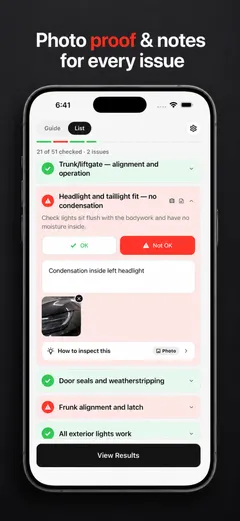
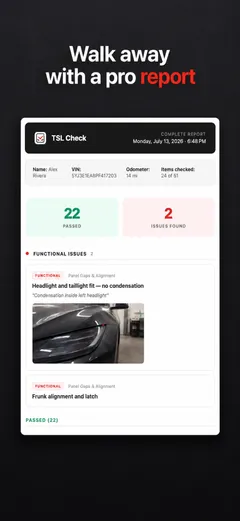
TSL Check is the iPhone app we make for delivery day. Its checklist takes you around the car area by area, with a photo and a note on whatever you find, and a report you can keep with your order paperwork (how it works).
It keeps your photos on your iPhone and has no connection to your order, appointments or payments, so it cannot reschedule anything for you.
Whatever you find at delivery, ask the advisor to record it before you sign, and keep a copy.
Frequently asked questions
Can I reschedule my Tesla delivery appointment?
Yes, according to Tesla's Taking Delivery support page, which we read on November 8, 2026. It says you can reschedule your appointment from the Tesla app at any time, if needed, subject to the 48-hour note below.
How do I reschedule in the Tesla app?
Tesla lists four steps: open the Tesla app, open your pre-delivery tasks, go to the Scheduling tab, then tap Reschedule and choose a date and time that works for you.
What is Tesla's 48-hour rule for rescheduling?
Tesla's note says deliveries scheduled within the next 48 hours are not eligible to be rescheduled in the Tesla app. We did not find a Tesla page that says what to do for an appointment inside that window, so contact your advisor.
Does rescheduling change my vehicle or my delivery window?
Tesla's page does not say. It does say that once a VIN is assigned, the vehicle cannot be moved to another location, and that if you cannot pick it up there Tesla may need to find a new vehicle, which may significantly impact your estimated window. Ask your advisor before you move the date.
Is this the same as my delivery date changing on its own?
No. Rescheduling is your choice of a new appointment. A delivery estimate that moves or disappears is something Tesla says can happen as production and logistics schedules change. See our guide on why the delivery date changes.
Does this apply outside the United States?
Not necessarily. This guide covers the United States. Tesla's pages for other countries can describe scheduling differently, so read the one for your market.