What belongs on my Tesla delivery checklist, and in what order do I do it on pickup day?
Do it in this order: finish the app tasks and documents before the appointment, bring what Tesla lists, walk around the car in daylight before you accept delivery in the Tesla app, and ask the advisor to record anything you find before you sign. Tesla's US pages list the steps at the location but none of them is an inspection of the car, so that step is yours.
Who this guide is for
This guide is for the United States. It puts a Tesla delivery day in the order it happens, so you know what to do at each point. We use Tesla’s Delivery Day and Taking Delivery pages, which we read on November 6, 2026. We show no prices, and we do not publish a full inspection list here: that lives in the app. For the longer story of what happens at the center, see what to expect at a Tesla delivery center.
1. Before the appointment: close the loop in the app
Tesla says that after you order, you use the Tesla app to give your registration and delivery location, and that these details are required to move forward. You also choose whether you are financing and whether you are trading in a car. As delivery approaches, Tesla says you will be asked to complete a credit application and to submit your trade-in self-inspection, if it applies.
Before the appointment, Tesla says you must submit your insurance details, final payment and the necessary documents in the app, and e-sign any agreements if you finance or lease with Tesla. In Texas, New Mexico, Iowa and Michigan, Tesla says final payment is due before you can schedule. If your appointment needs to move, Tesla says you can reschedule from the app.
2. Pack what Tesla lists
Tesla’s Delivery Day page says the documents may include final payment, driver’s license(s), auto insurance and trade-in ownership documents. It adds that final payment requirements vary by location and purchase method, and that credit cards are not accepted for final payment. If the car comes with a charging question mark, note that Tesla says charging equipment does not come standard with every vehicle.
3. Pickup checklist: arrive, check in, and stop before you tap
Tesla’s steps at a location are: follow the signs to check-in, sign the available agreements, complete final payment and accept delivery of your vehicle in the Tesla app, then unlock and explore the car.
None of those steps is an inspection of the car. That is why we suggest a different order for you: walk around the car before you accept delivery in the app. Accepting is the step that is hard to reverse. Everything you find is easier to raise while the car is still on Tesla’s lot and the advisor is next to you.
4. The walk-around: method, not a list
This part is our suggestion, not Tesla’s. A method beats a memory.
- Use daylight, and go in the same direction every time. Pick a starting point and circle the car once, then the glass and wheels, then the inside.
- Two photos per finding. One wide, so the location is clear, one close, with the date visible on your phone.
- Note it where you are. A short note next to the photo saves you from reconstructing it at home.
- Rate it. Decide on the spot whether it is cosmetic, something to fix or something to stop for.
The full list of what to look at, item by item, is in TSL Check. For two areas where people often want more detail, see Tesla panel gaps at delivery and what comes with a new Tesla.
5. If you find something, say it before you sign
Ask the advisor to record it in the paperwork or in the Tesla app, and keep a copy. The Tesla pages we read do not describe how a defect found at delivery is handled, and what you can do next depends on your contract and local law. For what Tesla’s warranty page says, see what Tesla’s warranty says about a defect found at delivery. This is not legal advice.
6. After you unlock the car
Tesla says you unlock the car with the app and explore its features with interactive videos, and that the Tesla Tutorials and the Owner’s Manual are on the touchscreen. For the manual, tap Service on the touchscreen. Tesla also recommends reviewing Meet Your Tesla, Full Self-Driving and Software Updates before you take delivery. If your delivery is not at a Tesla location, the steps differ: the center guide above covers the other options. For purchase documents, registration and what comes next, see after taking delivery of a Tesla: what to keep and expect.
Keep your own record
TSL Check is the iPhone app we make for delivery day. It takes you around the car area by area, with a photo and a note on whatever you find, and a report you can keep with your order paperwork (how it works). It keeps your photos on your iPhone and has no connection to your order, appointment or payments.
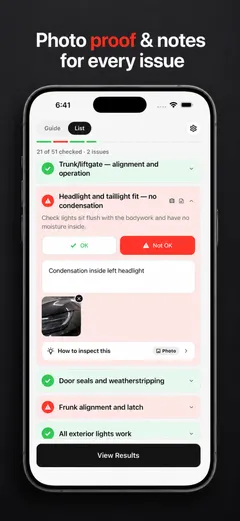
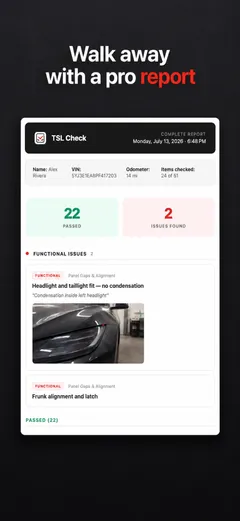
Whatever you find at delivery, ask the advisor to record it before you sign, and keep a copy.
Frequently asked questions
What should be on a Tesla delivery day checklist?
Two parts. The tasks Tesla asks for: app details, payment, insurance and documents before the appointment, then check-in, final payment and accepting delivery in the Tesla app. And the part Tesla does not list: your own look at the car before you accept. The full item-by-item list for that part lives in TSL Check.
Does Tesla inspect the car with me on delivery day?
The steps Tesla lists on its Taking Delivery page, which we read on November 6, 2026, are check-in, signing agreements, final payment, accepting delivery in the app, unlocking and exploring features. An inspection of the car is not one of them.
What documents do I bring to a Tesla delivery?
Tesla's Delivery Day page says the documents may include final payment, driver's license(s), auto insurance and trade-in ownership documents. It says requirements vary by location and purchase method, and that credit cards are not accepted for final payment.
When do I accept delivery?
Tesla says you accept delivery of your vehicle in the Tesla app at check-in. Our suggestion: look the car over first, because accepting is the step you cannot easily take back. What you can do after you find a problem depends on your contract and local law.
Can I reschedule the appointment?
Tesla says you can reschedule at any time from the Tesla app. If your date keeps moving, see why the Tesla delivery date keeps changing.