Can you cancel a Tesla order, or refuse the car at delivery?
Tesla's US ordering page says you can cancel a vehicle order in the Tesla app: Vehicle Details, Manage Order, Cancel Order, then choose your reasons and submit. It also says the order fee is one-time and non-refundable. In the text we read, it says nothing about refusing the car on delivery day or returning it afterwards, and we found no return policy on Tesla's support pages.
Who this guide is for
This guide is for the United States. It is for you if you have a Tesla on order, or are about to take delivery, and you want to know what Tesla says about cancelling the order or refusing the car. Everything we attribute to Tesla comes from its support page “Ordering a Tesla Vehicle”, which we read on November 20, 2026, and from its delivery page “Taking Delivery”, which we read on November 19, 2026. We show no prices, because the pages give none. Your purchase agreement may say more than these pages, and Tesla can change its pages, so check them yourself. This is not legal advice.
How to cancel an order, according to Tesla
Tesla’s ordering page has an answer to “How do I cancel my vehicle order”. It says to cancel from the Tesla app:
- Open the Tesla app.
- Tap “Vehicle Details,” then “Manage Order.”
- Enter your account details to sign in.
- Tap “Manage Order,” then “Cancel Order.”
- Select the reasons to cancel from the dropdown.
- Tap “Submit Cancellation.”
The same page says that when you place an order, you pay a one-time, non-refundable order fee with a credit card.
What Tesla’s page does not say
In the text we read, the ordering page does not say until when you can cancel, what happens to payments you made after the order fee, or whether you can refuse the car on delivery day or return it afterwards. We also found no return policy on the Tesla support pages we looked at. For any of those, ask your Tesla advisor in writing and read your purchase agreement.
What the delivery page does say
On the day, Tesla’s delivery page says that at a Tesla location you follow the signs to check-in, sign any available agreements, complete final payment and accept delivery of your vehicle in the Tesla app. It says that if you finance with a lender of your own, delivery cannot take place until Tesla receives the funding in full. It does not describe what happens if you decide not to go through with it at that point.
If you find a problem
A defect or a gap you spot at delivery is a different question from cancelling. For what Tesla’s warranty says about defects found at delivery, see Tesla warranty: defects at delivery. For what to look at on the panels, see Tesla panel gaps at delivery. For something that just seems off, see something looks off on my new Tesla.
Our suggestions
These are our suggestions, not Tesla’s.
- If you are unsure, ask before delivery day. Ask your advisor in writing what happens if you decline the car on the day and what happens to your payments. Keep the answer.
- Do not accept delivery in the app until you are ready. Tesla lists accepting delivery as a step on the day. Look at the car first, zone by zone, before you sign and before you accept.
- Photograph and note what you find, and ask the advisor to record it before you sign. A dated record is what you can point to afterwards.
- Do not assume a return window exists. We found none on Tesla’s support pages, so if someone mentions one, ask for it in writing.
- Keep your documents. Order confirmation, purchase agreement and any written answer from Tesla belong in one place. See the delivery day checklist and why a delivery date can move in why your Tesla delivery date keeps changing.
Other countries differ
The ordering pages we read for Germany, France, Spain and Turkey say the payment made when you order is not refundable, and we found no cancellation steps on them. The Spanish page words it as a non-refundable payment of the full amount, which is different from the one-time order fee of the others, so ask your advisor what applies to you. If you live elsewhere, read your own country’s page.
Keep your own record
Before you drive off, go through the car area by area and note what you find. TSL Check is the iPhone app we make for delivery day. Its checklist takes you around the car with a photo and a note on whatever you find, and a report you can keep with your order paperwork (how it works).
It keeps your photos on your iPhone and has no connection to your Tesla Account, so it cannot cancel an order or change one.
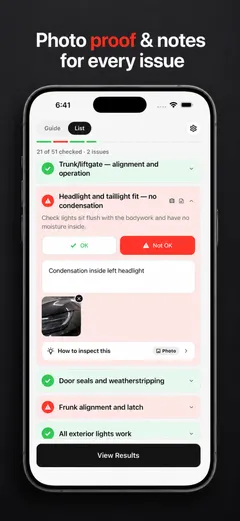
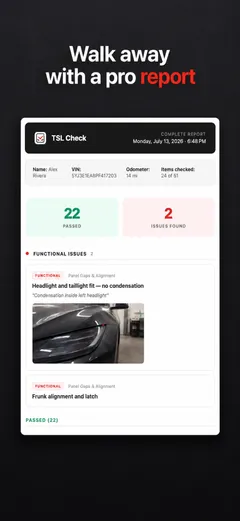
Whatever you find at delivery, ask the advisor to record it before you sign, and keep a copy.
Frequently asked questions
Can I cancel my Tesla order?
Tesla's page, which we read on November 20, 2026, says you can cancel a vehicle order from the Tesla app. Open the app, tap Vehicle Details, then Manage Order, sign in, tap Manage Order again, then Cancel Order, select the reasons from the dropdown and tap Submit Cancellation. The page does not say until when you can cancel.
Do I get my order fee back?
Tesla's page says that when you place your order you pay a one-time, non-refundable order fee with a credit card. In the text we read, it does not say what happens to other payments if you cancel later. Ask your Tesla advisor in writing, and read your purchase agreement.
Can I refuse a Tesla at delivery?
In the text we read, Tesla's pages do not say. The delivery steps describe check-in, signing agreements, final payment and accepting delivery in the Tesla app, but nothing about declining the car on the day. Ask your advisor in writing before delivery day what happens if you decline, and do not accept delivery in the app until you are ready.
Is there a Tesla return policy?
We found no return policy on the Tesla support pages we read on November 19 and 20, 2026. The ordering page covers cancelling an order, not returning a vehicle after delivery. If a friend or a forum mentions a return window, ask your advisor to confirm it in writing before relying on it.
Is this the same in other countries?
No. The German, French, Spanish and Turkish ordering pages we read say the order payment is not refundable, but we found no cancellation steps on them. The Spanish page words the payment differently from the others. This guide is for the United States.
Sources
- Tesla Support: Ordering a Tesla Vehicle (United States), consulted Nov 20, 2026 (opens in a new tab)
- Tesla Support: Taking Delivery (United States), consulted Nov 19, 2026 (opens in a new tab)
- Tesla Deutschland: Einen Tesla bestellen, consulted Nov 20, 2026, for comparison only (opens in a new tab)
- Tesla France: Commander un véhicule Tesla, consulted Nov 20, 2026, for comparison only (opens in a new tab)