How does a Tesla lease work, and what should I know before I apply?
On Tesla's US leasing page you apply in the Tesla app after you order, and the approval is valid for up to 60 days, so a delayed delivery can mean reapplying. Leasing is only for personal use and not offered in every state. Mileage, taxes, insurance and who the lessor is sit in your lease agreement. Tesla's page is the source; this is not financial advice.
Who this guide is for
This guide is for the United States. It follows Tesla’s own “Leasing Your Tesla Vehicle” support page, which we read on November 1, 2026. If you live elsewhere, leasing is set by local rules and by Tesla’s page for your country: in the UK, see Tesla Personal Contract Hire UK. We give no prices, payments, rates or fees, because they change and depend on your credit. This is not financial advice.
The short answer
You lease from Tesla by ordering a car, then applying in the Tesla app. Tesla says it reviews your application on submission, that most credit decisions arrive within 48 hours (many within minutes), and that the approval is valid for up to 60 days. Leased Teslas are for personal use only. Whether Tesla or another company is your lessor decides who you call, which insurance wording applies and what the lease-end options are.
Who can lease
Tesla says leasing is not available in every state and lists the states on its page; Certified Pre-Owned leasing is offered in fewer. It also says you must be over 18, have a Social Security number and match the name on the application to the name on the registration, and that this person must take delivery. Business-only, trust and commercial financing are not available at this time, and a leased Tesla cannot be used for transport or rental purposes. If leasing is offered in your state but no delivery location is nearby, you may have to take delivery in another state, and Tesla says carrier direct delivery is not available for leasing orders.
How the application works
- Order first. You can compare lease pricing in Tesla’s tool before ordering; it is only available for the Model 3 and the Model Y. When you order, you select Lease as the payment method.
- Use the Tesla app. After you order, download the app, finish the first self-guided delivery tasks and, in the Financing section, answer Yes to leasing or financing and pick Tesla Lease.
- Confirm your terms. You review your preferred amount due at signing, monthly payment, term in months and annual mileage.
- Wait for the decision. You can follow the status in the Financing section. If you are approved, you review and accept the offer in the app and an advisor contacts you about delivery. If you are denied, Tesla says a team member contacts you.
Tesla says there is no fee to submit an application and that at least one hard pull of your credit report is required. It recommends lifting credit freezes before you apply, for at least seven days.
If your delivery date moves
Tesla says the approval is valid for up to 60 days and that, if your delivery date is pushed back after the application expires, you may need to reapply. If a freeze was lifted for the first application, it may need to be lifted again. Dates move for many reasons: see why a Tesla delivery date changes. Ask your advisor in writing what happens to your approval if your date slips.
What Tesla says you pay besides the monthly payment
Tesla’s page points to a few cost areas, without us repeating any figure:
- Mileage. The yearly allowance is in your lease agreement, and extra miles are charged at a per-mile rate set there. Tesla says you may buy additional mileage in the app if your lease is directly with Tesla Lease Trust, the car is new, there are no outstanding payments and the purchase is at least three months before the lease ends.
- Taxes and fees. Taxes or fees tied to the leased car are passed on to you, and some states charge an annual personal property tax that is not in your monthly payment.
- Tolls. Toll violations are passed on to you, and Tesla may add a processing fee for each one.
- Excess wear. See our guide on returning a leased Tesla.
Insurance and who the lessor is
Tesla lists minimum coverage requirements, physical damage insurance for the full value of the car and a maximum deductible, and asks that Tesla Lease Trust be named as lienholder and additional insured. It says the lease comes with gap protection. We do not reproduce the figures: read them on Tesla’s page and in your agreement. For how insurance fits before delivery, see insuring a Tesla before delivery.
Your lessor is named on your lease agreement, which you can find in the Tesla app under My Products, then Documents. If it is a third-party lessor, Tesla says to ask that lessor about payments, insurance requirements and lease-end options, because they may differ.
What we did not confirm
We did not read a Tesla lease agreement, the residual value, the finance charge built into a lease or your state’s rules. We do not know the credit score Tesla needs. Tesla’s page says estimates are not guaranteed and are subject to its underwriting process. For help choosing between leasing and buying, see lease or buy a Tesla.
Questions to ask before you sign
These are our questions, not Tesla’s:
- Who is my lessor, and where do I read its terms?
- What is the total of the amount due at signing and every monthly payment?
- What is my annual mileage allowance, and what does each extra mile cost?
- What does my agreement say about wear, and can I buy the car at the end?
- What happens to my approval if my delivery date moves past 60 days?
- Which state taxes, fees and insurance requirements apply to me?
- What does it cost to end the lease early?
Record the car on day one
At the end of a lease, the lessor compares the car with its wear guide. Photographing the car when you take it makes it easier to show what was there from the start. TSL Check is the iPhone app we make for Tesla deliveries: its checklist takes you around the car area by area, with a photo and a note for each point (how it works). It does not touch your lease or payments.
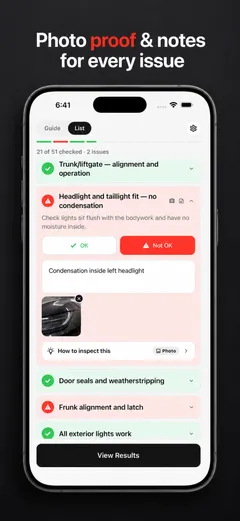
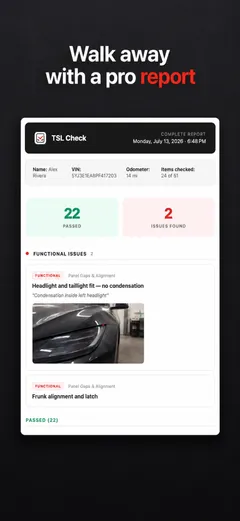
Whatever you find at delivery, ask the advisor to record it before you sign, and keep a copy.
Frequently asked questions
How do I apply for a Tesla lease?
Tesla's US page says you place your order, sign in to the Tesla app, finish the first delivery tasks and, in the Financing section, choose Tesla Lease as the financing type. You then confirm the amount due at signing, the monthly payment, the term and the annual mileage. Tesla says there is no fee to submit an application.
How long is a lease approval valid?
Tesla says approvals are valid for up to 60 days and are subject to credit approval. If your delivery date is pushed back after the application expires, you may need to reapply.
Can I lease a Tesla in any state?
No. Tesla says leasing is not available in all states, and it lists the states on its page. Leasing a Certified Pre-Owned Tesla is available in fewer states. Check the current list on Tesla's page before you plan around it.
Who can apply for a Tesla lease?
Tesla says you must be over 18 and have a Social Security number. The name on the application must match the name on the vehicle registration, and that person must take delivery. Business-only, trust and commercial financing are not available.
Do I need to carry insurance on a leased Tesla?
Yes. Tesla lists minimum coverage requirements, physical damage insurance for the full value of the vehicle and a maximum deductible, and it asks you to list Tesla Lease Trust as lienholder and additional insured. Tesla also says the lease comes with gap protection. Read the exact figures on its page and in your agreement.
Can I buy a leased Tesla or hand it back early?
Tesla says you can buy your leased vehicle at the end of the lease where your agreement allows it, and that an early termination is possible but can be costly. Our guide on returning a leased Tesla covers both.