How do you prepare for a Tesla Mobile Service appointment?
Tesla's US page says to schedule in the Tesla app, note all your concerns there before the visit (you can edit them until 24 hours before), and not install the update that may appear on the day, which the technician sent. The car must be easy to reach, with room to work and no pets, and you grant the technician access in the app. The page gives no prices, durations or list of repairs.
Who this guide is for
This guide is for the United States. It is for you if you have a Tesla, or one on order, and expect to book a service visit at some point, for a problem you notice after delivery or for routine care. Everything we quote comes from Tesla’s page on preparing for a Mobile Service appointment, which we read on November 14, 2026. We show no prices, because the page gives none, and Tesla can change its page, so check it yourself.
Mobile Service is not a traditional visit
Tesla’s page says Mobile Service with Tesla Service is a bit different from a traditional maintenance visit. If you have not scheduled yet, scheduling a service appointment in the Tesla app is the first step. If you booked a Service Center visit instead, Tesla points you to the steps for preparing for that visit, which are on another page. Tesla’s page then splits the rest into before, during and after.
Before the appointment
Tesla says to make sure you have noted all your concerns in the Tesla app before the visit. The technician reviews your notes before the appointment and brings the tools and parts needed to service your car. You can change these notes up until 24 hours before the scheduled appointment.
On the day, Tesla says you may see a pending software update in the car. That update was sent by your Mobile Service technician, who needs it to repair the car. Tesla’s instruction is not to install any updates on the day of your appointment, because installing one may significantly increase the time of your repair and appointment. For software updates in general, see your Tesla’s first software update after delivery.
What the technician needs
For a Mobile Service appointment, Tesla says the car must be easily accessible, have adequate working space around it and not contain any pets. You must also give the technician all of the following:
- specific instructions to the car’s location;
- access codes or information about gate attendants, security guards or any other security measures;
- access to a garage or shelter in case of extreme weather;
- access to a restroom.
During the appointment
Before the technician arrives, Tesla says you must grant them permission to access your car in the Tesla app, and that you will get a message with instructions on how before the appointment. The technician arrives at the agreed location and waits up to 15 minutes before moving on to the next scheduled appointment if they cannot get to your car.
For the technician’s safety, Tesla asks you to refrain from taking photos, videos or audio recordings of the technician or of the maintenance. Tesla also says it reserves the right to remove access to Mobile Service for a customer whose behavior makes its personnel feel abused, threatened, discriminated against, attacked or unsafe.
When the work is finished
Tesla says that when the appointment is complete you receive a notification in the Tesla app and a text message that the service is complete. If there is an outstanding balance, you can pay it through the Tesla app at that time.
What Tesla’s page does not say
Tesla’s page does not say what a visit costs, how long it takes, which repairs Mobile Service can do and which need a Service Center, or whether it is offered where you live. For those, ask a Tesla Advisor in writing, or check the Tesla app. If the problem is a defect you found at delivery, see what Tesla says about the warranty; for routine care, see what Tesla recommends for maintenance. If the car breaks down or you get a flat tire, see what Tesla says about Roadside Assistance.
Our suggestions for the notes
These are our suggestions, not Tesla’s. Since the technician reads your notes ahead of the visit and the notes can be edited until 24 hours before, write down when the problem started, when it happens and what you tried. If it began right after delivery, say so and mention what you wrote down then. Do not photograph or record the technician, as Tesla asks.
Keep your own record
Notes taken at delivery help you describe a problem later. TSL Check is the iPhone app we make for delivery day. Its checklist takes you around the car with a photo and a note on whatever you find, and a report you can keep with your order paperwork (how it works). It keeps your photos on your iPhone and has no connection to your order, appointments or payments, so it cannot book a service visit for you.
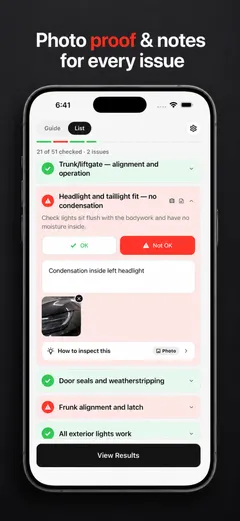
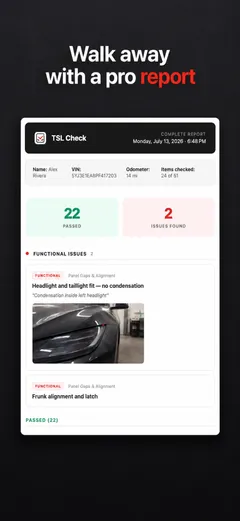
Whatever you find at delivery, ask the advisor to record it before you sign, and keep a copy.
Frequently asked questions
What is the first step to get Mobile Service?
Tesla's page, which we read on November 14, 2026, says that if you have not scheduled yet, scheduling a service appointment in the Tesla app is your first step. A Service Center visit has its own preparation steps on a different page.
What should I do before the technician comes?
Tesla says to note all your concerns in the Tesla app. The technician reviews your notes before the appointment and brings the tools and parts needed, and you can change the notes until 24 hours before the appointment.
Should I install the software update I see on the day?
No. Tesla says that on the day you may see a pending update sent by your Mobile Service technician, who needs it to repair the car, and tells you not to install any updates that day because doing so may significantly increase the repair and appointment time.
What does the technician need from me?
Tesla says the car must be easily accessible, have adequate working space around it and not contain pets. You must give the technician specific instructions to the car's location, access codes or information about gate attendants or security, access to a garage or shelter in case of extreme weather, and access to a restroom.
Can I take photos or video of the visit?
Tesla asks you to refrain from taking photos, videos or audio recordings of the technician or the maintenance, for the technician's safety.
What happens when the work is done?
Tesla says you receive a notification in the Tesla app and a text message that the service is complete. If there is an outstanding balance, you can pay it through the Tesla app at that point.