I just took delivery of my Tesla: what do I keep, where do I find my documents and what comes next?
Keep what you get at delivery and check your Tesla Account for the rest. Tesla's US page says you receive the Monroney label (window sticker) when you take delivery, and the purchase agreement appears under Documents in your Tesla Account afterward. Registration varies by state, and each lender sends payment details on its own schedule.
Who this guide is for
This guide is for the United States. It covers what comes after you drive off: which papers you should have, where the rest will appear and who contacts you about payments. We use Tesla’s After Taking Delivery and Delivery Day pages, which we read on November 7, 2026. We show no prices, and we do not publish a full pickup checklist here: that is in the app. For the day itself, see what to do on pickup day, in order.
1. Service and warranty
Tesla says its vehicles are designed to need as little maintenance as possible, with step-by-step guidance for minor maintenance and repairs. For anything more, you schedule a service appointment in the Tesla app. New vehicles are covered by the New Vehicle Limited Warranty, and Certified Pre-Owned vehicles by the Pre-Owned Vehicle Limited Warranty.
The page does not say how long you have to report something you notice after delivery, and it does not describe how a defect is handled. For what Tesla’s warranty page says, see what Tesla’s warranty says about a defect found at delivery. This is not legal advice.
2. Your purchase documents
Tesla says you receive the Monroney label, the window sticker, when you take delivery of a new vehicle. Monroney labels are only available for new vehicle purchases.
The rest is online. Purchase documents, including the Motor Vehicle Purchase Agreement, appear in your Tesla Account after you take delivery. Sign in, select Manage under the vehicle, and look in the Documents section for the signed documents.
Our suggestion, not Tesla’s: check that section the day after delivery, and save a copy of the agreement next to the window sticker and your own photos from the pickup.
3. Registration and incentives
Tesla says the registration process varies by state of registration and links to guides for titling and registration in your state. It also says that, as a new owner, you may be eligible for savings at the state or local level, and points to its pages on electric vehicle and solar incentives. We did not read those state pages, so we say nothing about your state.
4. Payments if you finance or lease
Tesla’s page has a table of what each lender sends and when. The timing differs by lender. Tesla Finance LLC sends a welcome email with a link to the Tesla app on the day you take delivery. Santander’s welcome email comes 7 to 10 days after delivery. For Ally, TD Auto, U.S. Bank and Wells Fargo, the table says 10 to 14 days after delivery. Some lenders count from loan finalization instead, such as PNC and Capital One. Read the row for your own lender, because the table can change.
Our suggestion: note the date of delivery and the date the first message should arrive, so you know when to ask if it has not.
5. Accessories and learning the car
Tesla points you to the Tesla Shop for accessories and to Tesla Support and its walkthrough videos to get up to speed. On the Delivery Day page, Tesla also says to tap Service on the touchscreen for the digital Owner’s Manual. What comes in the box is in what comes with a new Tesla.
The first days: our suggestions
These are our suggestions, not Tesla’s:
- Repeat your pickup walk-around once in daylight at home, and photograph anything new with the date visible.
- If you find something, write it down and message your advisor or schedule a service appointment in the Tesla app, then keep a copy of what you sent.
- Keep one folder with the window sticker, the purchase agreement, your pickup report and the lender’s first message.
Keep your own record
The paperwork is easier to follow when you already have your own record of the car on the day it arrived.
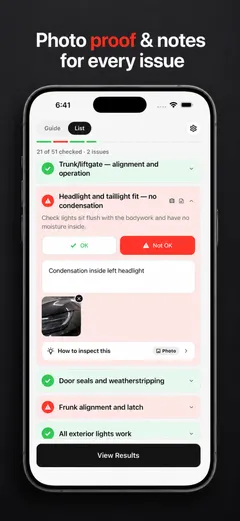
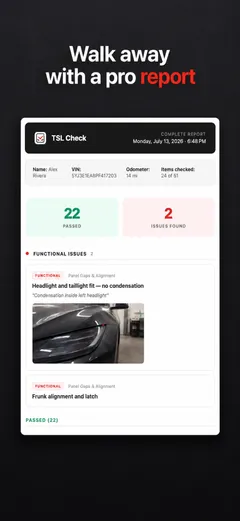
TSL Check is the iPhone app we make for delivery day. It takes you around the car area by area, with a photo and a note on whatever you find, and a report you can keep with your order paperwork (how it works).
Your photos stay on your iPhone, and the app has no connection to your order, appointment or payments.
Whatever you find at delivery, ask the advisor to record it before you sign, and keep a copy.
Frequently asked questions
Where do I find my Tesla purchase documents after delivery?
Tesla says purchase documents, including the Motor Vehicle Purchase Agreement, are available online in your Tesla Account after you take delivery. Sign in, select Manage under the vehicle, and find the signed documents under the Documents section.
What is the Monroney label?
Tesla calls it the window sticker and says you receive it when you take delivery of a new vehicle. It says Monroney labels are only available for new vehicle purchases.
Who handles registration after I take delivery?
Tesla's page says the registration process varies by state of registration and links to guides on titling and registration in your state. We did not read those state pages for this guide.
When will my lender contact me?
It depends on the lender. Tesla's table lists, for example, a welcome email with a link to the Tesla app on the day you take delivery for Tesla Finance LLC, and a welcome letter or packet 10 to 14 days after delivery for lenders such as Ally, TD Auto, U.S. Bank and Wells Fargo. Some lenders count from when the loan is finalized instead.
What do I do if something is wrong after I take delivery?
Tesla's page says that if more service is needed, you schedule a service appointment in the Tesla app, and that new vehicles are protected by a New Vehicle Limited Warranty. The page does not describe a window for reporting a problem you spot after delivery.