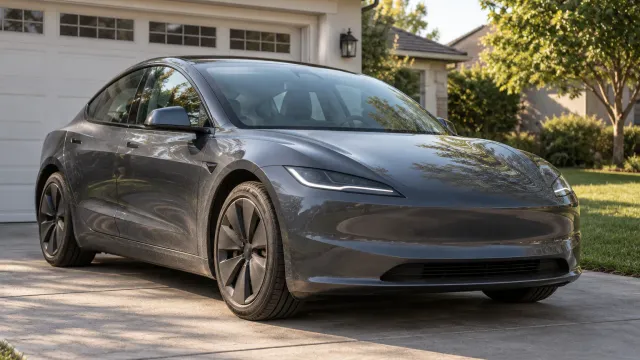
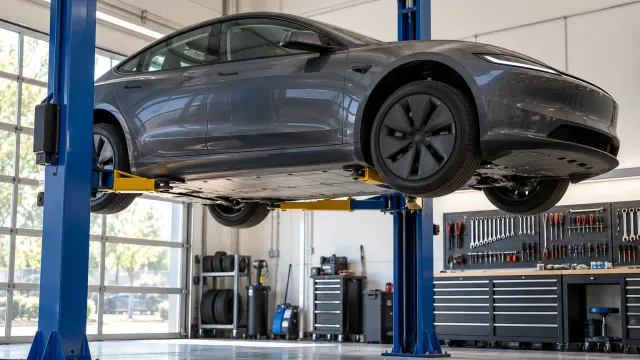
I just bought a used Tesla. What should I check in the first week?

Start with access: make sure the car is in your own Tesla account and that no phone key or key card from the previous owner is still on it. Then spend the week learning the car's normal: how it charges where you live, what drains it while parked, tire pressures, brakes and any alerts. Write down and photograph anything odd, and check open recalls and warranty by VIN.
Who this guide is for
You have just bought a used Tesla, from a private seller or a dealer, and the first days feel different from what you expected. The battery seems to drop while the car sits, you are charging more often than you planned, and you are not sure what you should have checked already. This guide is for the United States and uses Tesla’s support pages, Tesla’s Model Y Owner’s Manual and the FTC’s used-car guide. Other models have their own manual, and the menus can move between software versions, so check the manual on your car’s touchscreen when something here does not match.
If you are still deciding whether to buy, our guide on what to ask a private seller covers the part before the sale.
Day one: make the car yours in the Tesla app
On a used Tesla, ownership in the Tesla app is not automatic. Tesla’s support page says that when you buy from a third party, you must add the vehicle in the Tesla app to claim ownership and get access to features like Supercharging and roadside service. It also says that each vehicle can only have one owner and one Tesla Account at a time, and that a transfer removes vehicle information and access from the previous owner.
What to do, based on that page:
- If you can still reach the seller, Tesla says that if needed you should contact the previous owner to approve the ownership transfer request, and that a transfer can stall on pending action from the previous owner.
- Otherwise, claim it yourself: in the Tesla app, tap the menu, then “My Products” > “Add Product” and follow the prompts. Tesla says to make sure you have the vehicle, access to Wi-Fi and the latest version of the Tesla app, and that you will be asked for the VIN, documents and owner information.
- Tesla lists the documents it accepts: a photo of a driver’s license, passport or state identification, and proof of ownership such as proof of temporary registration, a photo of the registration, the title or a bill of sale.
Tesla’s page also warns that Supercharging credits, upgrades, subscriptions and some other features may not be transferable. If the seller promised a feature, check that it shows on the car after the transfer, and keep the promise in writing.
Day one: remove keys you do not hold
The previous owner may still have a phone key or a key card paired to the car. You cannot see a key card in their drawer, but you can see it in the car.
Tesla’s Model Y Owner’s Manual says the list of all keys that can access the car is under Controls > Locks, with an icon showing whether each one is a phone key, key card or key fob. To remove a key, you touch its trash icon and confirm by scanning an authenticated key on the card reader. The manual also says the car requires at least one authenticated key card or key fob at all times.
Our suggestion: open the key list with the keys you were given in your hand, and delete every entry you cannot match to one of them. Then add your own phone key. If the car is leased, the manual says to contact your leasing company to add or remove keys.
While you are in the menus, look through what the previous owner left: driver profiles, saved places and any garage door settings. They are not yours, and you do not need them.
Days one to three: learn how it charges where you live
A common worry in the first week is charging every day without a charger at home. Two things help.
First, the charge limit. Tesla’s manual says to refer to the touchscreen (Controls > Charging) or the Tesla app for recommended daily and trip charging limits. Set the daily limit there rather than copying a number from a forum.
Second, where you plug in. Tesla’s manual says Tesla strongly recommends leaving the car plugged in when not in use, to keep the battery at the optimum level of charge. If you have no home charger yet, our guide on charging a Tesla from a normal outlet covers what the U.S. Department of Energy says about everyday charging from a household outlet.
Charging more often than you expected is not, on its own, a sign of a problem. Write down for a few days the charge level when you arrive and when you leave, and the miles in between. A week of notes tells you more than one bad morning.
Days one to three: find out why the battery drops while parked
If the charge falls overnight, start with the settings. Tesla’s manual lists what uses energy while the car is parked and not plugged in: preconditioning or climate use, Summon, the infotainment and climate system, Sentry Mode, and requests from the Tesla app or third-party apps. It also says Sentry Mode and Cabin Overheat Protection can impact range, and to disable features when they are not needed.
On a used car there is one extra question: which settings did the previous owner leave on? Sentry Mode, Cabin Overheat Protection, climate schedules and old third-party app connections can all be running without you knowing. Our page on a Tesla that loses battery overnight goes through those checks in order, so we will not repeat them here.
If you are worried about the battery’s health over the long term rather than overnight, see what a battery health figure on a used Tesla means.
During the week: tires, brakes and alerts
Tesla’s Model Y manual has a short list of daily checks. It includes the battery’s charge level, the condition and pressure of each tire, that exterior lights, horn, turn signals, wipers and washers work, any unexpected indicator lights or alerts on the touchscreen, and the brakes, including the parking brake. In the first week, that list is a good routine.
- Tire pressure. The manual says to keep tires at the pressures on the Tire and Loading Information label on the center door pillar, even if it differs from what is printed on the tire, and to check them cold. The touchscreen also shows the recommended cold pressures.
- Tire wear. The manual says to inspect the tread and side walls for bulges, foreign objects, cuts or wear, and to watch the inner shoulder. On a used car, look at all four and note whether they wear evenly.
- Brakes. Because of regenerative braking, the manual says the pads are used less, and Tesla recommends pressing the brake pedal often to dry the pads and rotors and avoid rust and corrosion. Note any grinding, pulsing or noise.
- Alerts. Tap any alert on the touchscreen and write down what it says, with the date.
During the week: body, glass and noises in daylight
The day you collected the car, you may have seen it in a hurry, in a parking lot or after dark. Look again in daylight, slowly.
- Walk around the car and look along each panel for scratches, chips, dents and panels whose color does not quite match.
- Check the windshield and the glass roof against a bright sky for chips and cracks.
- Look under the car for fluid. The manual says a small pool of water from the air conditioning is normal, but other fluid deposits might indicate a leak.
- Drive a familiar route with the music off and note any rattle, clunk or wind noise: where it comes from, at what speed and on what kind of road.
None of this needs tools. It needs good light, time and a record you can show someone.
During the week: recalls and warranty by VIN
Two checks you do with the VIN.
Recalls. Enter the VIN in NHTSA’s recall search to see if the car has unrepaired recalls. The FTC notes that federal law does not require dealers to fix recalls on used cars, so you might need to get the repair done yourself. Our guide on checking a Tesla for recalls by VIN explains what the search shows and what it does not.
Warranty. Tesla’s Vehicle Warranty page says the New Vehicle Limited Warranty will follow your vehicle and be transferred to the new owner when a vehicle ownership transfer is performed through Tesla. How much coverage is left depends on the car and its terms, so read the warranty document for your vehicle rather than a number you heard. The FTC adds that other warranties and service contracts may not be transferable.
When to talk to the seller, and when to talk to Tesla
The seller. If something you find contradicts what you were told or what is in your contract, raise it with the seller early and in writing, with your photos. With a private seller, the FTC says the sale probably will be “as is” unless your agreement says otherwise, and that a seller must live up to the promises stated in a written contract. With a dealer, read your paperwork. What you can ask for depends on that contract and your state’s law. We are not lawyers and this is not legal advice.
Tesla. For anything about the car itself, schedule service in the Tesla app once the car is in your account. Tesla’s manual asks you to give as much detail as possible, including photos, sound recordings or videos, the dates and times the issue happened, the conditions and the vehicle settings. That is exactly what a week of notes gives you.
What a week of notes still leaves loose
By the end of the week you have photos in your camera roll, a few notes in another app and a memory of a noise on Tuesday. Pulling that together for a seller or for Tesla service is the hard part, and it is where things get lost.
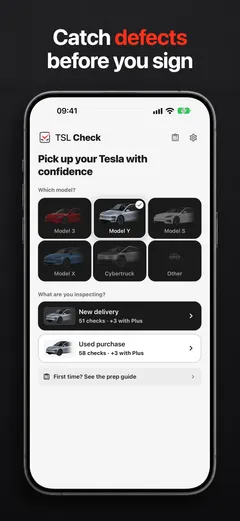
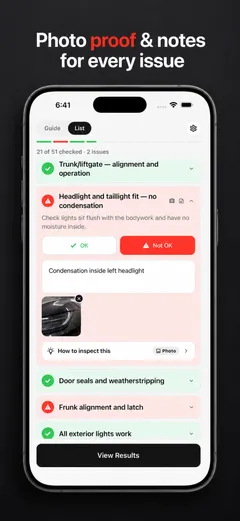
TSL Check is the iPhone app we make for this. Choose the used purchase and your model, and its checklist walks you through the car area by area, including the Tesla account transfer, keys, battery and range, the 12V battery, tire tread, brakes and rust, open recalls and warranty (how it works). On any item you can add a photo and a note, mark how serious it is, and save the VIN and odometer reading with the inspection. Everything stays on your iPhone, and the summary is ready to send to the seller or to attach to a service request.
A used Tesla that you have checked in daylight, with your own keys and a record of what you found, is a car you know. No account. No guesswork. Nothing missed.
Frequently asked questions
How do I get a used Tesla into my own Tesla app?
Tesla's support page says that when you buy from a third party you must add the vehicle in the Tesla app to claim ownership, entering the VIN and uploading documents. It also says that, if needed, you should contact the previous owner to approve the ownership transfer request. The steps can change, so follow the prompts in the current app.
How do I remove the previous owner's keys?
Tesla's Model Y Owner's Manual says the key list is under Controls > Locks, that you delete a key with its trash icon and confirm by scanning an authenticated key on the card reader. It also says the car needs at least one authenticated key card or key fob at all times. Other models have their own manual, so check yours.
My used Tesla loses charge overnight. Is something wrong?
Not necessarily. Tesla's manual lists what uses energy while the car is parked and not plugged in, including Sentry Mode, and says Sentry Mode and Cabin Overheat Protection can impact range. Check those settings first; our page on battery loss overnight goes through them.
Does the Tesla warranty carry over to me?
Tesla's warranty page says the New Vehicle Limited Warranty follows the vehicle and is transferred to the new owner when the ownership transfer is performed through Tesla. What is left depends on the car's age, mileage and the terms for that car, so read the warranty document for your vehicle.
Can I still go back to a private seller after the sale?
It depends on your contract and state law. The FTC says private sales usually are not covered by the implied warranties of state law and probably will be on an "as is" basis unless the agreement says otherwise, and that a seller must live up to the promises in a written contract. We are not lawyers; for anything serious, ask a qualified professional.
Sources
- Tesla Support: How to Add or Remove Vehicles in the Tesla App, consulted Oct 22, 2026 (opens in a new tab)
- Tesla Model Y Owner's Manual: Keys, consulted Oct 22, 2026 (opens in a new tab)
- Tesla Model Y Owner's Manual: Getting Maximum Range, consulted Oct 22, 2026 (opens in a new tab)
- Tesla Model Y Owner's Manual: Charging Instructions, consulted Oct 22, 2026 (opens in a new tab)
- Tesla Model Y Owner's Manual: Tire Care and Maintenance, consulted Oct 22, 2026 (opens in a new tab)
- Tesla Model Y Owner's Manual: Maintenance Service Intervals, consulted Oct 22, 2026 (opens in a new tab)
- Tesla Support: Vehicle Warranty (United States), consulted Oct 22, 2026 (opens in a new tab)
- Federal Trade Commission: Buying a Used Car (consumer guide, April 2021), consulted Oct 22, 2026 (opens in a new tab)