I just got my VIN: what happens next?
Tesla's checklist says to upload proof of insurance in the Tesla app once you receive a VIN. Before your appointment you must also submit final payment and any documents in the app, and sign the agreements if you finance with Tesla. You schedule once Tesla notifies you in the app.
What this page covers
You got a VIN and now you are wondering what to do. This page is for the United States and only uses what Tesla says on its own support pages. Tesla pages can change, and your order can differ from the general case, so the Tesla app is the final word on your own steps.
1. Insurance
Tesla’s list for taking delivery says that once you receive a VIN, you upload proof of insurance in the Tesla app. Tesla also says that before your delivery appointment you must submit your insurance details, final payment and necessary documents in the app.
What an insurer needs, and from which day it can cover a car it has not seen yet, is not in Tesla’s pages. That is a question for your insurer, and a good one to ask now: “I have a VIN, what do you need from me, and from which date does cover start?” If you are in the UK, where Tesla’s delivery page does not list insurance, see insuring a Tesla in the UK before delivery.
2. Paying the balance
How you pay depends on how you bought the car, and Tesla says requirements vary by location and purchase method. Three cases it describes:
- You finance or lease with Tesla. You must e-sign any required agreements. You find them in the Tesla app, and they must be completed and signed before you take delivery.
- You use your own bank or lender. Tesla says most lenders require a Motor Vehicle Purchase Agreement (MVPA), which you find in the app once your vehicle is ready for delivery. You are responsible for securing and submitting the amount financed and any remaining balance before delivery, and Tesla says delivery cannot take place until it receives the funding in full.
- You pay in full. Credit cards are not accepted for final payment.
One state rule: Tesla says customers in Texas, New Mexico, Iowa and Michigan must submit final payment before they schedule their delivery appointment, because of state restrictions.
If your bank asks for an invoice, the MVPA is the document Tesla names for lenders. We cannot say more than that, so ask your lender what it accepts.
3. Documents
Tesla says the documents required at your delivery appointment may include final payment, your driver’s license(s), auto insurance and trade-in ownership documents. Not all of them apply to everyone. Check your own list in the app and put the originals together before the day.
4. Scheduling your appointment
A VIN is not the same as a delivery date. Tesla says you receive a notification in the Tesla app to schedule once a vehicle is assigned to your order and there is an estimate for when it will arrive at your delivery location. If your date has been moving, see why the Tesla delivery date keeps changing.
Tesla’s pages we read do not say how many days pass between the VIN and the appointment, so we do not either. Once you have an appointment you can reschedule it in the app, except within the next 48 hours.
5. Delivery day
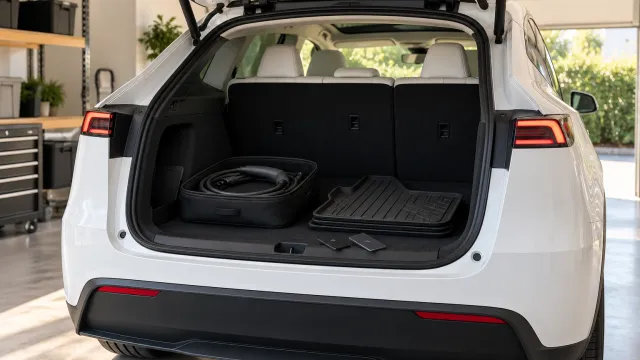
At check-in, Tesla says you sign any available agreements, complete final payment and accept delivery in the Tesla app. Before that, you will want to know what comes with the car and what you buy yourself: our guide to what comes with a new Tesla covers what Tesla says about keys, charging equipment and accessories.
While you wait: what to prepare
Our suggestion, not Tesla’s list:
- Make the insurance call and keep the answer in writing.
- Confirm with your bank or Tesla how final payment will work, and who sends what.
- Put your documents together in one place, original and a phone photo.
- Decide how you will check the car, before you are standing next to it with someone waiting.
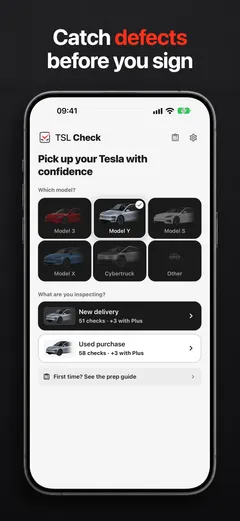
That last one is where TSL Check comes in. It is the iPhone app we make, and its delivery checklist takes you around the car area by area, with the severity of each item and a photo and note on whatever you find (how it works). Opening it before the appointment, choosing your model and reading the list is a calm way to use this stretch.
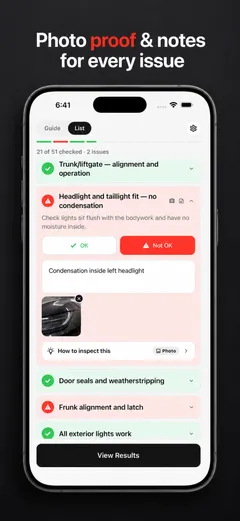
Whatever you find on the day, ask the delivery advisor to record it before you sign. What you can do next depends on your contract and local consumer law, so read your order paperwork while you wait.
Frequently asked questions
Should I send my VIN to my insurer now?
Tesla's checklist says to upload proof of insurance in the Tesla app once you receive a VIN. What your insurer needs, and from which date cover can start, is their decision, so ask them directly.
I am financing through my own bank. What does the lender need?
Tesla says most lenders require a Motor Vehicle Purchase Agreement (MVPA), which you can find in the Tesla app once your vehicle is ready for delivery. Tesla also says you are responsible for securing and submitting the amount financed and any remaining balance before delivery.
Can I pay the balance by credit card?
No. Tesla's Delivery Day page says credit cards are not accepted for final payment, and that requirements vary by location and purchase method.
How long after the VIN will my delivery be?
The Tesla pages we read give no number. Tesla says you get a notification in the Tesla app to schedule once a vehicle is assigned to your order and there is an estimate for when it will arrive at your delivery location.
Can I still change my appointment after I book it?
Yes, in the Tesla app, through your pre-delivery tasks and the Scheduling tab. Tesla says deliveries scheduled within the next 48 hours are not eligible to be rescheduled in the app.