How do I check a Tesla for open recalls with the VIN?
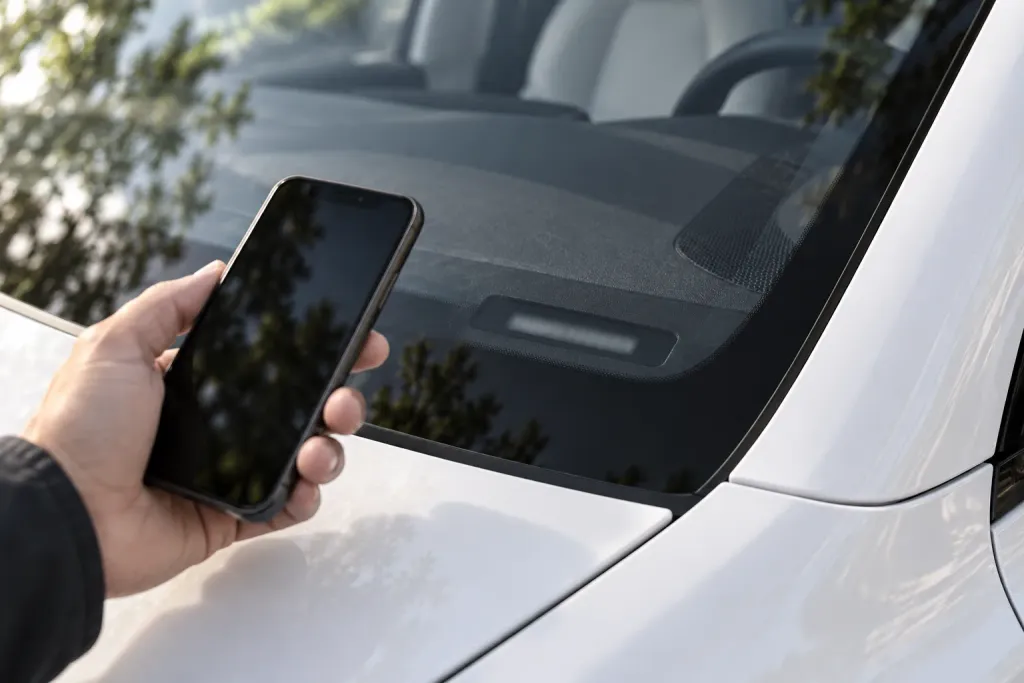
Enter the 17-character VIN (or the license plate) in NHTSA's recall search. It tells you if that specific vehicle has an unrepaired recall, or shows "0 unrepaired recalls associated with this VIN." It does not show recalls that were already repaired or some very recent ones, so check again before you buy or take delivery, and ask the seller or Tesla about anything the search leaves out.
What this guide covers
This guide is for the United States. It uses the National Highway Traffic Safety Administration (NHTSA) recall search, the FTC’s used-car guide and Tesla’s Owner’s Manual for where to find the VIN. We do not list recalls here, because they change: the search below shows the current ones for your car.
Step 1: find the VIN
Every vehicle has a unique vehicle identification number. NHTSA says to look on the lower left of the windshield for the 17-character VIN, and that it is also on the registration card and may be shown on the insurance card.
On a Tesla, the Model Y Owner’s Manual adds three places: the touchscreen under Controls > Software, a plate at the top of the dashboard that you can see through the windshield, and the Vehicle Certification label on the door pillar. If you are buying from a private seller, ask for the VIN before you drive anywhere, and match it to the car when you see it.
Step 2: search NHTSA
Go to NHTSA’s recall page and search by license plate or VIN. NHTSA explains what you will see: a search by VIN or license plate tells you if a specific vehicle needs to be repaired as part of a recall. If it has no unrepaired recalls, you see the message “0 unrepaired recalls associated with this VIN.”
If you are checking several cars, NHTSA says you can search up to 100 VINs at once.
What the search does not show
A clean result is useful, but it is not the whole story. NHTSA lists what the VIN search will not show:
- a safety recall that has already been repaired
- some recently announced safety recalls for which not all VINs have been identified yet (NHTSA says VINs are added continuously, so check regularly)
- safety recalls that are more than 15 years old, except where a manufacturer offers more coverage
- recalls by small vehicle manufacturers
- manufacturer customer service or other non-safety campaigns
For a Tesla bought in the US, the first two matter most. A recall that was repaired is not a problem in itself, but you may want to ask what the repair was. A very recent recall may not show yet: check again close to the day you buy or take delivery.
Step 3: ask Tesla
Tesla has its own recall search by VIN. Its page (tesla.com/vin-recall-search, which takes you to Tesla Service) asks you to enter your complete 17-digit VIN to get the latest information on any open safety recalls that apply to your Tesla vehicle, and shows the date its recall data is as of. Use it as a second source, and if the two differ, ask Tesla. Tesla’s page points to the Tesla Service Center, and to a form with the topic “Recalls”, for questions.
If you are buying a used Tesla
The FTC says to check whether there are any unrepaired recalls on a vehicle by entering the VIN, or by calling NHTSA’s hotline. It also says that federal law does not require dealers to fix recalls on used cars, so you might need to get the repair done yourself, and that all safety recalls pose a risk, so you should not wait. Do this before you travel, and again when you see the car. Our guide on what to ask a private seller puts it in the context of the other questions.
If you are taking delivery of a new Tesla
Once you receive the VIN, search it: a new car can be affected by a recent recall, and NHTSA notes that VINs are added continuously. If you want to know what to expect at pickup, see what to expect at a Tesla delivery center. If you find an open recall, ask your Tesla Advisor how it will be handled before you accept delivery.
What to do if there is an open recall
NHTSA says manufacturers are required to fix the problem by repairing it, replacing it, offering a refund, or in rare cases repurchasing the vehicle. What that looks like for your car, and how long it will take, is for Tesla to tell you: do not guess. Write down the recall number and what you were told.
Alerts
NHTSA offers a free app, SaferCar, that sends an alert to your phone when it finds a safety recall for the vehicle you entered.
A short routine
Our suggestion, not an official procedure:
- Get the VIN and confirm it matches the car.
- Search NHTSA and note the date and the result, with a screenshot.
- Search Tesla’s tool and compare.
- Ask the seller or Tesla about anything that is open, and about repairs already done.
- Search again on the day you buy or take delivery, because the list can change in between.
Keep the screenshots with your other records: they show what was on file when you decided.
Where a checklist helps
A recall search tells you what is on record. It does not tell you what is wrong with the car in front of you. TSL Check is the iPhone app we make for that part. Its checklists, for a new delivery or a used purchase, take you around the car area by area, with a photo and a note on whatever you find (how it works). Keep the recall search and the checklist side by side: one is the paper record, the other is what you see.
If something looks off, what to do when something looks slightly off on your new Tesla has the steps.
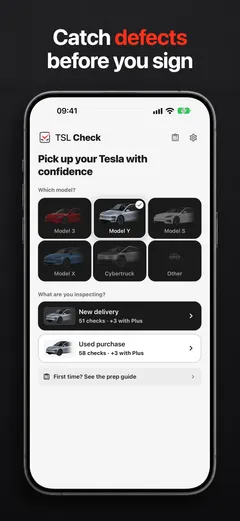
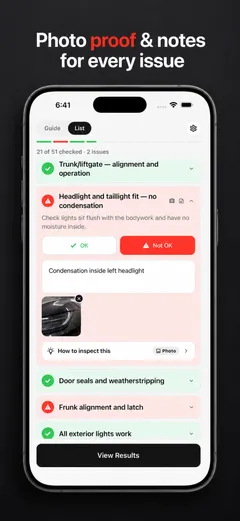
Whatever you find, ask the advisor or the seller to record it before you sign.
Frequently asked questions
Where do I find the VIN of a Tesla?
NHTSA says to look on the lower left of the windshield for the 17-character VIN, and notes it is also on the registration card and may be on the insurance card. Tesla's Model Y Owner's Manual lists the touchscreen (Controls > Software), a plate at the top of the dashboard visible through the windshield, and the Vehicle Certification label on the door pillar.
What does the NHTSA VIN search show?
NHTSA says a search by VIN or license plate shows if a specific vehicle needs to be repaired as part of a recall, meaning an unrepaired recall for a vehicle from certain manufacturers. If there are none, it shows "0 unrepaired recalls associated with this VIN."
What does the NHTSA VIN search not show?
NHTSA lists a safety recall that has already been repaired, some recently announced recalls for which not all VINs have been identified, safety recalls more than 15 years old, recalls by small manufacturers, and manufacturer customer service or other non-safety campaigns.
Do dealers have to fix recalls on used cars?
The FTC says federal law does not require dealers to fix recalls on used cars, so you might need to get the repair done yourself. It also says to check yourself by entering the VIN in the recall lookup, and that all safety recalls pose a risk.
Can I get alerts about new recalls?
NHTSA says its free SaferCar app sends an alert to your phone when it finds a safety recall for the vehicle you entered.
Should I check a new Tesla too?
Yes, once you have the VIN. NHTSA notes that VINs are added continuously for recently announced recalls, so check regularly rather than once.
Sources
- NHTSA: Check for Recalls, Vehicle, Car Seat, Tire, Equipment, consulted Oct 19, 2026 (opens in a new tab)
- Federal Trade Commission: Buying a Used Car (consumer guide, April 2021), consulted Oct 19, 2026 (opens in a new tab)
- Tesla Service: VIN Recall Search, consulted Oct 19, 2026 (opens in a new tab)
- Tesla Model Y Owner's Manual: Identification Labels (North America), consulted Oct 19, 2026 (opens in a new tab)