Which apps help you buy or take delivery of a Tesla, new or used?
We read each App Store listing on November 20, 2026. For a new Tesla, Tesla's own pages use the official Tesla app for tasks, final payment and accepting delivery. TSL Check, the app we make, describes itself as a guided inspection for delivery day and used purchases. The car-shopping apps describe listings, prices and vehicle history; none of their listings mentions Tesla.
Who this guide is for
This guide is for the United States. It is for you if you are buying a Tesla, new or used, or about to take delivery, and you want to know which apps are worth a look and what each says it does. We read the App Store listing of each app on November 20, 2026, and Tesla’s delivery page on November 19, 2026. The apps are in alphabetical order, with no ratings and no prices. One of them, TSL Check, is the iPhone app we make, and we say so where it appears. Listings change, so check them before you install.
Taking delivery of a new Tesla
Tesla’s delivery pages use the Tesla app. They say to download it after placing your order and confirm your registration and delivery location, submit trade-in and payment details, upload proof of insurance once you have a VIN, submit final payment, and accept outstanding agreements and delivery in the app. For more, see pre-delivery tasks and the delivery day checklist.
Apps for finding and checking a used car
The apps below are general car-shopping apps. According to their listings they describe listings, alerts, prices and vehicle history. None of the listings mentions Tesla.
Autotrader
Its listing describes searching new and used cars from dealers and private sellers, a watchlist with alerts on price drops and new listings, a price badge on dealer listings that it ties to Kelley Blue Book, payment estimates, buying and selling tips, vehicle reports and financing options.
CARFAX - New & Used Cars
Its listing describes shopping for new, used and certified pre-owned cars. It says used car listings include a CARFAX Vehicle History Report, and it lists favorites with price-drop alerts, listing comparison, price history and dealership reviews. The report covers reported accidents and damage, airbag deployment, flood damage, owners, odometer readings, title information, service history and state emissions and inspection results.
Cars.com - New & Used Cars
Its listing describes searching new, used and certified pre-owned cars with filters for price, mileage, year, colors, features, fuel type and body style, dealership reviews, and offers to sell a current car and to finance the next one.
CarGurus
Its listing describes finding and comparing new, used and certified pre-owned cars, real-time price alerts, deal ratings, price history, car history, dealer reviews, a side-by-side comparison, and a Dealership Mode that pulls up inventory from the lot and estimates an all-in price. It also describes instant offers for a trade-in.
Kelley Blue Book
Its listing describes entering details about a vehicle to get a Fair Market Value, with help on what you could sell a car for, what a trade-in could bring, what similar cars in your area sell for, and research.
Apps that help on the day
Tesla
The official app, published by Tesla, Inc. Besides the delivery steps above, its listing describes controlling and monitoring the car, including charging, climate, lock and unlock, location and software updates.
TSL Check
This is the app we make. Its listing describes it as a guided inspection app for Tesla delivery day and used Tesla purchases. You check each area of the car in a clear order and keep a record of what you found.
The listing also describes an optional Plus upgrade with step-by-step inspection tips and defect images, unlimited inspection history, a customizable PDF report, a delivery and purchase prep guide and a battery range calculator for used cars. Its languages are English, French, German, Italian, Portuguese and Spanish. It does not connect to your Tesla account.
What the listings do not say
In the text we read, none of the five car-shopping listings mentions Tesla, and none describes a step-by-step walk-around checklist for the buyer. CARFAX’s listing says its report includes state emissions and inspection results, which is a record, not you looking over the car. Whether a history report is enough for you is your decision. For a used Tesla, see what to ask a private seller and what Tesla Certified Pre-Owned covers.
Our suggestions
These are our suggestions, not the listings’.
- Use a history report and an inspection together. A report is about the past; an inspection is about the car in front of you.
- Inspect before you sign, zone by zone, with a photo and a note on whatever you find, and ask the seller or the Tesla advisor to record it in writing.
- Do not rely on a price badge or a deal rating alone to decide a used Tesla is fine.
Other countries
We found no listing for the five car-shopping apps in the German, Spanish, French, Korean or Turkish App Stores on November 20, 2026, so this list is for the United States. The Tesla app and TSL Check are listed in all of them.
Keep your own record
Before you drive off, go through the car area by area and note what you find. TSL Check is the iPhone app we make for delivery day. Its checklist takes you around the car with a photo and a note on whatever you find, and a report you can keep with your order paperwork (how it works).
It keeps your photos on your iPhone and has no connection to your Tesla Account.
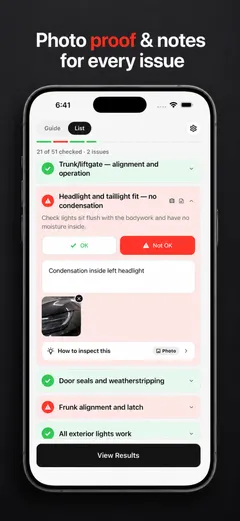
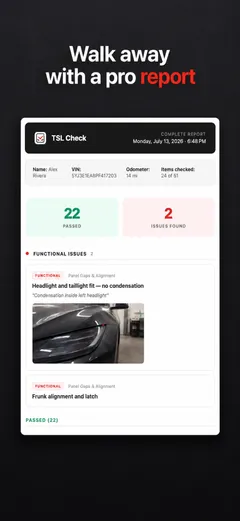
Whatever you find at delivery, ask the advisor to record it before you sign, and keep a copy.
Frequently asked questions
Which app do I need to take delivery of a new Tesla?
Tesla's delivery pages, which we read on November 19 and 20, 2026, use the Tesla app: you confirm your registration and delivery location, submit trade-in and payment details, upload proof of insurance once you have a VIN, submit final payment, and accept delivery in the app.
Which apps help when buying a used Tesla?
The listings we read describe car-shopping apps with listings, alerts, prices and vehicle history: Autotrader, CARFAX, Cars.com, CarGurus and Kelley Blue Book. None of those listings mentions Tesla. TSL Check, which we make, describes a guided inspection for used Tesla purchases.
Does a vehicle history report replace an inspection?
The listings do not say. CARFAX's listing says its report covers reported accidents and damage, owners, odometer readings, title information, service history and state emissions and inspection results. It does not describe you looking over the car. Our suggestion is to use a history report and an inspection together.
Is this a ranking?
No. The apps are in alphabetical order, there are no scores and no prices, and we have not tested them for this guide. We describe what each App Store listing says, and a listing is the developer's own description.
Is this the same in other countries?
No. The five car-shopping apps have US listings, and we found no listing for them in the German, Spanish, French, Korean or Turkish App Stores on November 20, 2026. The Tesla app and TSL Check are listed in all of them. This guide is for the United States.
Sources
- App Store: Autotrader - Shop & Buy Cars, listing read Nov 20, 2026 (opens in a new tab)
- App Store: CARFAX - New & Used Cars, listing read Nov 20, 2026 (opens in a new tab)
- App Store: Cars.com - New & Used Cars, listing read Nov 20, 2026 (opens in a new tab)
- App Store: CarGurus: Used & New Cars, listing read Nov 20, 2026 (opens in a new tab)
- App Store: Kelley Blue Book: We Know Cars, listing read Nov 20, 2026 (opens in a new tab)
- App Store: Tesla (Tesla, Inc.), listing read Nov 20, 2026 (opens in a new tab)
- Tesla Support: Taking Delivery (United States), consulted Nov 19, 2026 (opens in a new tab)