What are the Tesla pre-delivery tasks, and in what order do you do them?
Tesla's US pages describe the tasks in this order: confirm your registration and delivery location in the app, choose financing or a trade-in, complete the credit application and trade-in self-inspection when Tesla asks, upload proof of insurance once you have a VIN, submit final payment and sign any agreements. Tesla says completing them promptly helps keep delivery on time.
Who this guide is for
This guide is for the United States. It is for you if you have placed a Tesla order and the app now shows tasks to finish before delivery. Everything we quote comes from two Tesla Support pages, Delivery Day and Taking Delivery, which we read on November 9, 2026. We show no prices, and Tesla can change its pages, so check them yourself.
What Tesla calls delivery tasks
Tesla uses the phrase “delivery tasks” and says vehicle availability depends on several factors, including production, logistics and timely completion of your delivery tasks. It also recommends completing the steps as soon as possible after you place your order to help keep delivery on time. The tasks live in the Tesla app, under your pre-delivery tasks.
The order Tesla’s pages describe
Taken together, the two pages give this sequence:
- Registration and delivery location. After you order, download the Tesla app and provide them. Tesla says these details are required to move forward.
- Financing or trade-in. Select whether you plan to finance, or to trade in your current vehicle, and choose your payment method.
- Credit application and trade-in self-inspection. As delivery approaches, Tesla says you receive a notification to complete the credit application and submit the self-inspection, if they apply to you.
- Proof of insurance. Tesla’s Taking Delivery page says that once you receive a VIN, you upload proof of insurance in the app.
- Final payment. Tesla says you must submit it before your delivery appointment, and that credit cards are not accepted for it.
- Agreements. If you finance or lease with Tesla, you must e-sign the required agreements before you take delivery. Tesla says outstanding agreements are available in the app within 24 hours of your delivery appointment.
What depends on what
Three links between steps are worth knowing:
- The VIN comes first for insurance. Tesla’s Delivery Day page says you must submit your insurance details before the appointment, and its Taking Delivery page says to upload proof once you have a VIN. Read together, the proof waits for the VIN. If you are still waiting for one, our guide on insurance before delivery covers the UK, and what Tesla says about its insurance covers the US.
- Tasks come before the appointment. Tesla says you get a notification to schedule only once a vehicle is assigned and has an estimated arrival, and that availability depends partly on finishing your tasks.
- Funding comes before the keys. Tesla says delivery cannot take place until it receives the funding in full. With your own bank, it says most lenders require a Motor Vehicle Purchase Agreement, which you find in the app once the vehicle is ready, and that you are responsible for submitting the amount financed and any remaining balance. For customers in Texas, New Mexico, Iowa and Michigan, Tesla says final payment is due before scheduling, because of state restrictions.
What Tesla’s pages do not say
We looked for these and did not find them:
- A deadline for each task, or a penalty if one is late.
- Whether the app lets you do the tasks out of order.
- What happens to your appointment if a task is still open on the day.
- How long after a VIN is assigned the insurance upload must be done.
For these, ask your Tesla Advisor in writing.
Questions to ask your advisor
This section is our suggestion, not Tesla’s. Ask in the app or by email, and keep the reply.
- Which of my tasks are still open, and which do I need to finish before I can schedule?
- I have a VIN. Is there a date by which the proof of insurance must be uploaded?
- If I use my own bank, when will the MVPA appear in the app, and who confirms it was received?
- Can I still change my appointment if a task is still open? See can you reschedule a Tesla delivery appointment.
While the tasks are open
Finishing the tasks does not fix the date, which Tesla says can still move: see why the Tesla delivery date keeps changing. For the day itself, see what to expect at a Tesla delivery center and the delivery checklist. Tesla also notes that charging equipment does not come standard with every vehicle, so it is worth planning your home charging now: see home charging before delivery. For the payment and the papers to bring, see Tesla final payment and delivery documents.
Keep your own record
Take a screenshot of your task list in the app each time you finish one. If anything is later questioned, you can show what you completed and when.
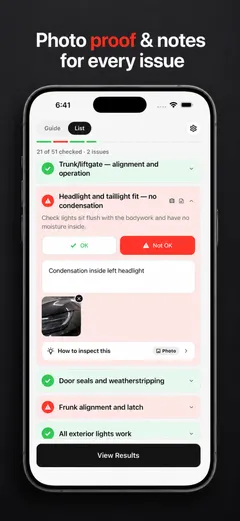
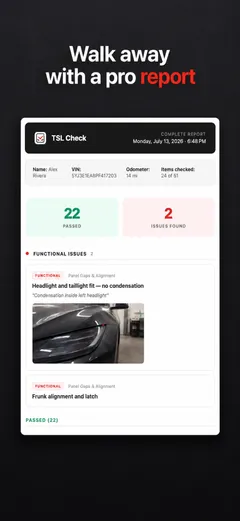
TSL Check is the iPhone app we make for delivery day. Its checklist takes you around the car area by area, with a photo and a note on whatever you find, and a report you can keep with your order paperwork (how it works).
It keeps your photos on your iPhone and has no connection to your order, appointments or payments, so it cannot complete any task for you.
Whatever you find at delivery, ask the advisor to record it before you sign, and keep a copy.
Frequently asked questions
What are Tesla's pre-delivery tasks?
They are the steps Tesla asks you to complete in the Tesla app before your delivery appointment. Tesla's pages list confirming registration and delivery location, choosing financing or a trade-in, submitting insurance, final payment and any required documents or agreements.
Do I have to do them in a set order?
Tesla's pages describe a sequence but do not say the app enforces one. They do tie two steps to events: proof of insurance comes once you receive a VIN, and the credit application and trade-in self-inspection come as delivery approaches.
When do I upload proof of insurance?
Tesla's Taking Delivery page says once you receive a VIN, upload proof of insurance in the Tesla app. Its Delivery Day page says you must submit insurance details before your appointment.
What happens if I do not finish the tasks?
Tesla's pages do not describe a penalty. They say vehicle availability depends partly on timely completion of your delivery tasks, and that delivery cannot take place until funding is received in full.
Do the tasks change if I use my own bank?
Tesla's page says most lenders with self-arranged financing require a Motor Vehicle Purchase Agreement, which you find in the Tesla app once the vehicle is ready, and that you are responsible for submitting the amount financed before delivery.
Does this apply outside the United States?
Not necessarily. This guide covers the United States. Tesla's pages for other countries describe fewer or different steps, so read the one for your market.