
Which apps do Tesla owners use, and what does each one say it does?
This is not a ranking. We read the App Store listing of each app on November 20, 2026 and describe what the listing says: the official Tesla app, which controls and monitors the car; A Better Routeplanner and PlugShare for trips and charging; TeslaFi and Tessie for logging and tracking; and TSL Check, the app we make, for inspecting the car on delivery day or when buying used.
Who this guide is for
This guide is for the United States. It is for you if you own a Tesla, or are about to, and want to know what the apps people mention actually say they do. We read the App Store listing of each app on November 20, 2026 and describe what the listing says, in our own words. The apps are in alphabetical order, there are no ratings, and we show no prices. One of them, TSL Check, is the iPhone app we make, so we say so where it appears. Listings change, and an app can change with them, so check the listing before you install.
How to use this list
This is not a ranking, and we have not tested the apps for this guide. A listing is the developer’s own description. Start with the official Tesla app, because Tesla’s own pages use it. Add a third-party app only if the listing describes something you need, and read what access it asks for before you connect it to your Tesla account. That last point is our suggestion, not something the listings say.
A Better Routeplanner (ABRP)
Its listing describes it as a service to plan trips with electric vehicles. You select your vehicle model, enter a destination and get a trip plan that includes charge stops and trip duration. A driving mode lets you follow the plan in real time, replan as needed and use it as a navigator. The listing says it supports every major EV on the market.
PlugShare
Its listing describes a map of EV and Tesla charging stations, fed by a community of drivers who add reviews and photos. You can filter the map by plug type, by charging speed, including DC fast chargers such as Tesla Superchargers, and by charging provider. The listing says the map covers North America, Europe and much of the rest of the world.
Tesla
This is the official app, published by Tesla, Inc. Its listing says it puts owners in direct communication with their vehicles and energy products. The functions it lists include checking charging progress and starting or stopping charging, heating or cooling the car before you drive, locking and unlocking remotely, locating the vehicle, sending an address to start navigation in the car, letting passengers control media, flashing the lights or honking, venting the panoramic roof, updating software, and monitoring a Powerwall. It lists Summon for vehicles with Autopilot, and says Powerwall features require Powerwall 2.
Tesla’s delivery pages also use the app for delivery tasks and for accepting delivery. For the first steps in it, see how to add a Tesla to the app and the phone key.
TeslaFi
Its listing calls it the logbook for your Tesla, now as an app. It says every drive, charge and idle hour is logged automatically, so you can see where the car has been, what it cost to run and how its battery is holding up. It lists Home Screen and Lock Screen widgets that show what the car is doing, and Siri and Shortcuts actions for things such as climate, locking, charging and Sentry Mode. The listing is in English only.
Tessie
Its listing describes an app to track, automate and protect your Tesla. It lists trip tracking, battery tracking and comparison with other cars, charging and phantom drain tracking, schedules and triggers for automation, notifications about driving, charging and Sentry events, a live charging view on the Lock Screen, OBD-level diagnostics through a tool it calls Profiler, Apple Watch control, and control from a Mac or PC browser. It also lists integrations with Alexa, Home Assistant and HomeKit, control using AI assistants, and importing data from other logging tools. The listing says it requires a subscription or a one-time payment.
TSL Check
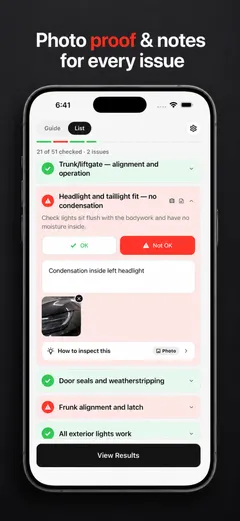
This is the app we make. Its listing describes it as a guided inspection app for Tesla delivery day and for used Tesla purchases. You check each area of the car in a clear order and keep a record of what you found, such as paint marks, panel gaps, glass issues, interior defects, missing accessories, screen warnings or charging problems.
The listing also describes an optional Plus upgrade with step-by-step inspection tips with defect images to compare, unlimited inspection history, a customizable PDF report, a delivery and purchase prep guide, and a battery range calculator for used cars. It lists English, French, German, Italian, Portuguese and Spanish.
It is not a tool for daily ownership and it does not connect to your Tesla account; it is for the day you pick up the car or buy it used, and for the record you keep afterwards. See the delivery day checklist and what to keep after taking delivery.
What this list does not cover
It does not cover every app. We did not read listings for apps we have not named, and we say nothing about how well any of these apps work, how often they are updated or how they handle your data. For those, read each listing and the developer’s own site.
Other countries
We checked that each of the six apps has a listing in the German, Spanish, French, Korean and Turkish App Stores. The languages differ: the listing of TSL Check, for instance, lists English, French, German, Italian, Portuguese and Spanish, but not Korean or Turkish. If you live elsewhere, read the listing in your own store.
Keep your own record
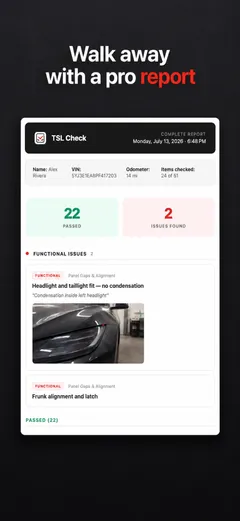
Before you drive off, go through the car area by area and note what you find. TSL Check is the iPhone app we make for delivery day. Its checklist takes you around the car with a photo and a note on whatever you find, and a report you can keep with your order paperwork (how it works).
It keeps your photos on your iPhone and has no connection to your Tesla Account.
Whatever you find at delivery, ask the advisor to record it before you sign, and keep a copy.
Frequently asked questions
Which is the official Tesla app?
The app named Tesla, published by Tesla, Inc. Its App Store listing says it puts owners in direct communication with their vehicles and energy products, and lists charging, climate, lock and unlock, location, software update and Powerwall monitoring among its functions. Tesla's delivery page also uses it for delivery tasks.
Are the other apps made by Tesla?
No. A Better Routeplanner, PlugShare, TeslaFi, Tessie and TSL Check are separate apps. We read each listing on November 20, 2026, and a listing is the developer's own description. Check what access an app asks for before you give it access to your Tesla account.
Is this a ranking of the best apps?
No. The title uses the words people search for, but the list is in alphabetical order and we give no scores. We describe only what each App Store listing says, and we have not tested the apps for this guide.
Which of these apps is for delivery day?
The official Tesla app, which Tesla's delivery page uses for tasks, final payment and accepting delivery, and TSL Check, which describes itself as a guided inspection app for delivery day and used purchases. We make TSL Check, so weigh that when you read our description.
Is this the same in other countries?
All six apps are listed in the German, Spanish, French, Korean and Turkish App Stores that we checked, but the languages of each listing differ. This guide is for the United States, and its source is the US listing of each app.
Sources
- App Store: Tesla (Tesla, Inc.), listing read Nov 20, 2026 (opens in a new tab)
- App Store: A Better Routeplanner (ABRP), listing read Nov 20, 2026 (opens in a new tab)
- App Store: PlugShare: Charging Stations, listing read Nov 20, 2026 (opens in a new tab)
- App Store: TeslaFi, listing read Nov 20, 2026 (opens in a new tab)
- App Store: Tessie, listing read Nov 20, 2026 (opens in a new tab)