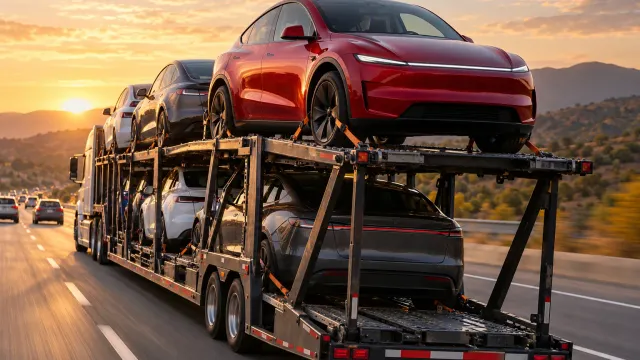
"Delivery scheduling will open once we confirm your vehicle's arrival date": what does it mean?
It means you cannot book a delivery appointment yet. Tesla's US pages say you get a notification in the Tesla app to schedule once a vehicle is assigned to your order and Tesla has an estimate of when it will arrive at the delivery location. We found that exact sentence on no Tesla web page, so it is app text we have not seen. Meanwhile, finish your pre-delivery tasks.
The short answer
The message means that scheduling is closed for now. On October 30, 2026, Tesla’s US pages described two conditions for it to open: a vehicle is assigned to your order, and Tesla has an estimate of when it will arrive at your designated delivery location. Then you receive a notification in the Tesla app to schedule your delivery appointment.
We did not find the sentence “Delivery scheduling will open once we confirm your vehicle’s arrival date” on any Tesla web page we read, in the US or elsewhere. It is text people see in the app, so we have not seen the screen and we do not claim to know every condition behind it. What follows is what Tesla’s own pages say.
What Tesla says about the estimate
Once your order has been placed, you can view the estimated delivery window at any time in the Tesla app. Tesla adds a note: “Your estimated delivery window may change or temporarily disappear in the Tesla app as production and logistics schedules are updated.” So a window that disappears is something Tesla warns about; the page does not say how long it lasts.
What Tesla says about delays
Tesla writes that each vehicle is built and transported after an order is placed, so manufacturing or logistics providers sometimes report delays, and that the app updates automatically with the most current information. When the delay is resolved, you receive a notification to schedule. The page gives no number of days and no date.
What to do while you wait
Tesla’s Delivery Day page says that before your appointment you must submit your insurance details, final payment and the necessary documents in the Tesla app, and, if you finance or lease with Tesla, e-sign the agreements. Our suggestions, not Tesla’s:
- Complete every pre-delivery task the app lists, so that nothing delays you once the date opens.
- Turn on notifications for the Tesla app.
- Take a dated screenshot of the message and of your estimated window.
- If you receive a VIN, see what happens after you get your VIN: Tesla says the vehicle cannot then be moved to another location.
If the window passes
Our reading: nothing on the pages we read gives a deadline after which Tesla must act, so we do not state one. Ask your advisor in writing what Tesla currently shows for your order and keep the reply. For why dates move, read why the Tesla delivery date keeps changing.
Other countries
Tesla’s delivery pages for other countries use different words. The UK page says: once your vehicle is available, Tesla will contact you to schedule a delivery appointment. We could not read the matching FAQ page for other countries, so do not assume the US conditions apply in yours.
What we did not confirm
We did not confirm how many days pass between the message and the notification, whether every order sees the message, or what the app shows exactly. We give no prices.
For the day itself, TSL Check is the iPhone app we make: its delivery checklist takes you around the car area by area, with a photo and a note for whatever you find (how it works). See also what to expect at a Tesla delivery center.
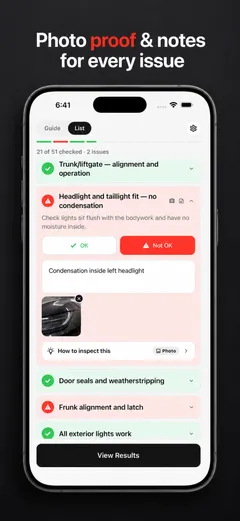
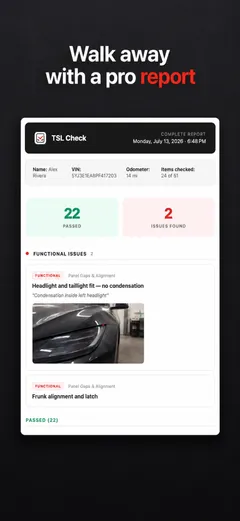
Whatever you find at delivery, ask the advisor to record it before you sign, and keep a copy.
Frequently asked questions
Where does this message appear?
It is text from the Tesla app, as people quote it. We searched Tesla's web pages and found the sentence on none of them, so we cannot show you the screen or its exact conditions. What we can show is what Tesla's delivery pages say about when scheduling opens.
When will I be able to schedule my delivery appointment?
Tesla's US page says: once you have a vehicle assigned to your order and Tesla has an estimate for when it will arrive at the designated delivery location, you will receive a notification in the Tesla app to schedule a delivery appointment.
Can I choose my delivery date before the message changes?
Not according to the pages we read. You can view the estimated delivery window in the Tesla app, and Tesla notes that it may change or temporarily disappear as production and logistics schedules are updated.
What if my estimated window has passed?
Tesla's page says each vehicle is built and transported after the order, that manufacturing or logistics providers can report delays, and that the app updates automatically. Once the delay is resolved, you receive a notification to schedule. Tesla gives no number of days.
Can I move my pickup to another location?
Tesla says that once a VIN has been assigned to your order, the vehicle is not eligible to be moved to another location. If you cannot pick it up there, Tesla needs to find another vehicle for your order, which may significantly affect your estimated delivery window.
Can I reschedule after I book?
Yes, in the Tesla app: pre-delivery tasks, then the Scheduling tab, then Reschedule. Tesla notes that deliveries scheduled within the next 48 hours cannot be rescheduled in the app.