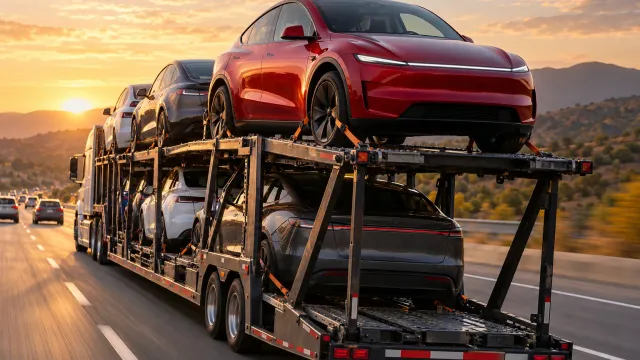
How long does a Tesla delivery take, and what does Tesla say about it?
Tesla's US pages give no fixed timeframe, in weeks or in days. They say you can see an estimated delivery window in the Tesla app after you order, that it can change or disappear for a while, and that availability depends on production, logistics and how quickly you complete your delivery tasks. The pages do not say how long the delivery appointment itself lasts.
Who this guide is for
This guide is for the United States. It is for you if you have a Tesla on order and want to know how long the wait and the delivery itself take, as far as Tesla says. Everything we quote comes from Tesla’s support pages “Delivery Day” and “Taking Delivery”, which we read on November 19, 2026. We give no timeframes of our own and no prices, because Tesla’s pages give none, and Tesla can change its pages, so check them yourself.
The stages Tesla describes, from order to delivery day
Tesla’s pages do not give a duration, but they do lay out the order in which things happen:
- You order and confirm your details. Tesla says to download the Tesla app after placing your order and confirm your registration and delivery location, and recommends completing these steps as soon as possible to ensure a timely delivery.
- You can see an estimated delivery window in the app. It says that once your order is placed, you can view it at any time in the Tesla app, and that the app is the source of truth for your delivery timing.
- The vehicle is built, transported and assigned. Tesla says each vehicle is built and transported after an order is placed. When it is assigned to you, it says you get an SMS saying so, and within several days another message with a link to schedule an appointment.
- You are invited to schedule. It says that once a vehicle is assigned and Tesla has an estimate for when it will arrive at your delivery location, you get a notification in the Tesla app to schedule.
- You finish the pre-delivery steps. As delivery approaches, it lists the credit application and trade-in self-inspection where they apply, and, before the appointment, your insurance details, final payment and documents in the app. Agreements may appear in the app within a short window before the appointment.
- You take delivery. On the day, Tesla describes check-in, signing, final payment and accepting delivery in the Tesla app.
Does Tesla give a timeframe?
No. In the text we read, there is no number of weeks or days from order to delivery, no width for the estimated window, and no length for the appointment. What Tesla gives instead is a window that it says is “subject to change” and that the app will always update.
What Tesla says can change the timing
- Production, logistics and your own tasks. Tesla says vehicle availability timing varies based on production, logistics and timely completion of your delivery tasks.
- Delays. If the vehicle is past the window you were first shown, Tesla says its manufacturing or logistics providers may report delays, the app updates by itself, and you are notified to schedule once the delay is resolved.
- Where the car is assigned. Tesla says you may be assigned a vehicle within a drive of your delivery address to keep delivery times reasonable, that once a VIN is assigned the vehicle cannot be moved to another location, and that if you cannot pick it up, Tesla would need to find another vehicle, which may significantly affect your estimated window.
- Payment and financing. In a few states, it says final payment must be submitted before you can schedule. If you arrange your own financing, it says delivery cannot take place until Tesla receives the funding in full.
- Independent carrier delivery. For customers far from a delivery location, Tesla describes an optional, fee-based carrier. The delivery date range comes from Tesla and is confirmed by the carrier once the vehicle is in transit, and Tesla recommends taking delivery at a Tesla location for faster delivery.
- A faster route. Tesla’s page says that if you need a vehicle sooner than your estimate, you can explore its existing inventory.
What Tesla’s pages do not say
In the text we read, the pages do not give a timeframe in weeks or days, do not say how wide the estimated window is, and do not say how long the delivery appointment lasts. For those, ask your Tesla advisor in writing.
Where our other guides pick up
This guide is about how long. For why a date moves, see why your Tesla delivery date keeps changing. For the app message that says scheduling is not open yet, see what “Delivery scheduling will open” means. For rescheduling an appointment, see can you reschedule a Tesla delivery appointment.
Our suggestions while you wait
These are our suggestions, not Tesla’s.
- Plan the day without assuming how long it takes. Since Tesla gives no length, keep the rest of the day free if you can, and ask your advisor in writing if you need to plan around it.
- Keep a dated screenshot of the window each time it changes. It helps you ask the advisor a precise question if the date moves.
- Use the wait to prepare. Do the steps Tesla lists in pre-delivery tasks, and read the delivery day checklist so the day itself goes without surprises.
Keep your own record
Before you drive off, go through the car area by area and note what you find. TSL Check is the iPhone app we make for delivery day. Its checklist takes you around the car with a photo and a note on whatever you find, and a report you can keep with your order paperwork (how it works).
It keeps your photos on your iPhone and has no connection to your Tesla Account, so it cannot tell you when your delivery will be.
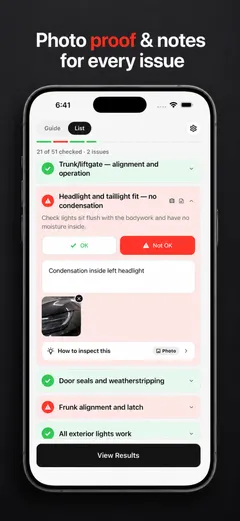
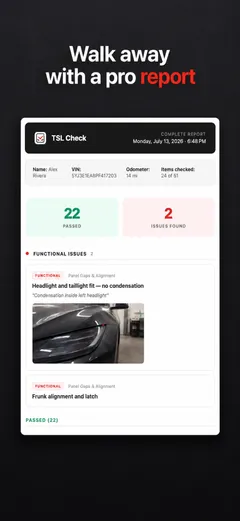
Whatever you find at delivery, ask the advisor to record it before you sign, and keep a copy.
Frequently asked questions
How long does a Tesla delivery take?
Tesla's pages, which we read on November 19, 2026, give no fixed timeframe. They say that once your order is placed you can see the estimated delivery window at any time in the Tesla app, and that vehicle availability timing varies based on production, logistics and timely completion of your delivery tasks. For your own order, the app is the place to look.
Does Tesla say how long the delivery appointment lasts?
Not in the text we read. Tesla's pages describe the steps on the day, from check-in to accepting delivery in the Tesla app, but they give no length for the appointment. If you need to plan the rest of your day around it, ask your Tesla advisor in writing.
What if my vehicle is past the estimated window?
Tesla says that because each vehicle is built and transported after an order is placed, its manufacturing or logistics providers can report delays. It says the Tesla app updates automatically with the most current information, and that once the delay is resolved you receive a notification to schedule your delivery appointment.
Can I get the car sooner?
Tesla's page says that if you need a vehicle sooner than your delivery estimate, you can explore its existing inventory options. For customers who live far from a delivery location and use the independent carrier option, it says taking delivery at a Tesla delivery location is faster.
Is this the same in other countries?
No. The German, Spanish, French, Korean and Turkish pages we read have a short delivery-day page that says Tesla will contact you to schedule once your vehicle is available, and that availability depends on production, logistics and completing your delivery tasks. We found no estimated window in the app, no delay notice and no independent carrier option on them. This guide is for the United States.
Sources
- Tesla Support: Delivery Day (United States), consulted Nov 19, 2026 (opens in a new tab)
- Tesla Support: Taking Delivery (United States), consulted Nov 19, 2026 (opens in a new tab)
- Tesla Deutschland: Auslieferungstag, consulted Nov 19, 2026, for comparison only (opens in a new tab)
- Tesla España: Día de entrega, consulted Nov 19, 2026, for comparison only (opens in a new tab)