How do you charge at a Tesla Supercharger for the first time?
Tesla's US page gives these steps: add and designate a default payment method in the Tesla app, open the charge port, plug in, wait for the port LED to flash green, follow the session in the app, then release the latch and unplug. Payment is taken from the app's method. At busy sites the car may cap charging at 80%, and you can raise it after plugging in.
Who this guide is for
This guide is for the United States. It is for you if you have a Tesla, or one on order, and want to know what Tesla says to do the first time you use a Supercharger. Everything we quote comes from Tesla’s Supercharging support page, which we read on November 11, 2026. We show no prices, rates or charging speeds, because Tesla says they vary, and Tesla can change its page, so check it yourself.
When Tesla suggests using a Supercharger
Tesla says Superchargers are ideal for long-distance travel, built to get you back on the road quickly. For daily commuting and local driving it points to home charging options instead. If you are still planning those, see home charging before delivery and charging from a normal outlet.
Before the first session: the payment method
Tesla says that before using a Supercharger you need to add and designate a default payment method in the Tesla app. Supercharging payments are charged automatically to the method you select, and Tesla says payments for Tesla vehicles can only be made and managed through the app. For the first time, that makes the app the first thing to set up, not the charger.
The page also says you can keep several payment methods in the app, but one must be designated as your Supercharging method before you use a Supercharger.
The steps at the Supercharger
Tesla’s page gives this sequence:
- Open the charge port with the vehicle touchscreen or the Tesla app. You can also press the bottom of the charge port door while the car is unlocked.
- Plug the connector in to the charge port.
- Watch the LED. Tesla says it flashes green once charging has begun.
- Follow the session in the Tesla app.
- Unplug by holding the button on the handle to release the latch, then pulling the handle out. The charge port closes automatically.
- Payment is processed directly from the payment method in the app once you unplug.
Should you charge to 100%?
Tesla’s answer depends on your trip. With navigation on, the car recommends the charge level needed to reach the next Supercharger on your route. To reduce congestion at high-use sites, the charge limit may be adjusted automatically to 80%, and you can raise it manually after plugging in, on the touchscreen or in the app. Tesla adds that charging slows as the battery fills, so reaching 100% typically takes significantly longer than reaching 80%.
Finding a Supercharger
Tesla says that in the car, the Trip Planner can locate a site while you are on the road. You enable it on the touchscreen under Settings, then Navigation, then Trip Planner. After you select a site, navigation routes you to the entrance of the property, and you can zoom in on the map to find the exact station. Tapping the station’s red lightning bolt icon shows more information.
Borrowed or rented cars
Tesla’s page says you can Supercharge a borrowed or rental vehicle as if you were the owner. The session goes to the payment method the owner designated in the app, so make sure you are authorized to use it. Only the owner can add or change that method.
What Tesla’s page does not say
We looked for these and did not find them:
- A first-time walkthrough for the stall itself, beyond the steps above.
- What to do if the LED does not flash green or the session does not start.
- How long your session will take, since it depends on the car and the site.
For these, ask a Tesla Advisor in writing, or check the Tesla app.
After delivery
Your first Supercharger stop may come right after you collect the car. For what to keep and check in the first days, see after taking delivery of a Tesla, and for the day itself, the delivery checklist.
Keep your own record
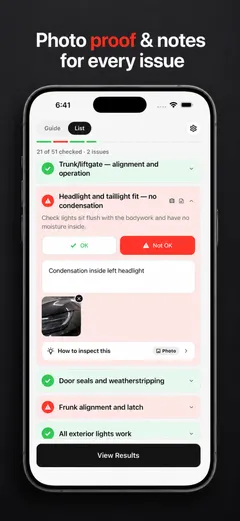
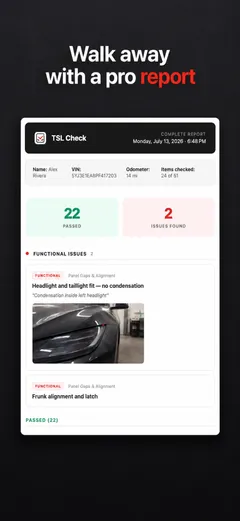
Before you drive off from delivery, check the car area by area and note what you find. TSL Check is the iPhone app we make for delivery day. Its checklist takes you around the car with a photo and a note on whatever you find, and a report you can keep with your order paperwork (how it works).
It keeps your photos on your iPhone and has no connection to your order, appointments or payments, so it cannot set up a payment method or start a charge for you.
Whatever you find at delivery, ask the advisor to record it before you sign, and keep a copy.
Frequently asked questions
How do I charge at a Supercharger for the first time?
Tesla's Supercharging page, which we read on November 11, 2026, says to open the charge port from the touchscreen or the Tesla app, plug the connector in, wait for the port LED to flash green, watch progress in the app, then hold the handle button to release the latch and pull the handle out.
Do I need a payment method before I plug in?
Yes. Tesla says that before using a Supercharger you add and designate a default payment method in the Tesla app, and that payments for Tesla vehicles can only be made and managed through the app. Payment is processed from that method once you unplug.
Should I charge to 100%?
Tesla says that with navigation on, the car recommends the charge level needed to reach the next Supercharger on your route. At high-use sites the charge limit may be adjusted to 80% automatically, and you can raise it after plugging in. Charging slows as the battery fills, so 100% takes much longer than 80%.
Can I Supercharge a borrowed or rental car?
Tesla's US page says yes, just as if you owned it. The session is charged to the payment method the vehicle owner designated in the app, so make sure you are authorized, and only the owner can add or change that method.
How do I find a Supercharger?
Tesla says the Trip Planner in the car can locate sites on the road. You enable it on the touchscreen under Settings, Navigation, Trip Planner; once you pick a site, navigation routes you to the property entrance.
Does this apply outside the United States?
The steps are the same on Tesla's pages for Germany, Spain, France, South Korea and Turkey, but payment details differ, so read the page for your market.