How does a Tesla trade-in work in the US, and which photos do I need to send?
Tesla's US support page describes a trade-in in three steps: an optional estimate before you order, a final offer after you order that is subject to a physical inspection, and handing over your car at your delivery appointment. Tesla may ask for clear outdoor daylight photos (all four sides and the interior, plus any damage) and does not accept photos taken in a garage. The offer is not negotiable.
Who this guide is for
This guide is for the United States. It follows Tesla’s “Trade-Ins” support page, which we read on October 22, 2026. It shows no prices or trade-in values, because Tesla works out the offer from your vehicle. The page also mentions a trade-in offer for Supercharging miles on gas and hybrid cars. That kind of offer changes, so we leave it to our guide on how Tesla promotions work. Tesla’s Trade-In Annex, which the page points to, is not reproduced here: read it before you accept an offer.
How a trade-in works
You hand your current car to Tesla as part of buying a new or Certified Pre-Owned Tesla. The steps, as the page describes them:
- An estimate, before you order (optional). You submit your VIN. For the final offer you must submit your VIN, odometer mileage, zip code and damage history.
- A final offer, after you order. The final offer is available after you place your order, subject to a physical inspection. Tesla says photos of the vehicle may be requested in the Tesla app, and that it will notify you when the offer is ready. You can view the offer in the Tesla app: open your pre-delivery tasks and go to the “Trade-In” section. While it is under review, the status reads “Trade-In Offer Pending.”
- Accepting the offer. If you accept, Tesla asks you to upload a photo of your vehicle title, or of your registration certificate if you are financing, leasing or your car is titled in a state where the lender holds the title. Tesla says it compares the documents with the National Motor Vehicle Title Information System (NMVTIS) to make sure the vehicle is in good standing.
- Delivery day. Once Tesla approves the trade-in, you hand over the car, and the title and lien release if they apply, at your scheduled delivery appointment.
If you change your mind, the page says you can remove the trade-in from your order in the Tesla app: pre-delivery tasks, “Trade-In,” then “Review” and “Reject Trade-In Offer,” choose a reason and submit.
Which vehicles Tesla accepts
Tesla says it accepts passenger cars, trucks, vans and SUVs toward a new or Certified Pre-Owned Tesla, whether they have an internal combustion engine or are electric. It does not accept motorcycles, RVs or commercial vehicles, and it does not accept more than one trade-in toward a purchase.
A few details from the page:
- Branded titles. Non-Tesla vehicles with a salvage, rebuilt, lemon, junk, recycled or not-actual-miles title can be traded in as long as the branding has been completed accurately with the state and shows on the face of the title. Tesla vehicles with those brands are not eligible.
- Inoperable cars. Non-Tesla vehicles that do not run are not eligible. Inoperable Teslas may be eligible case by case.
- Bonded titles. Tesla does not accept them.
- Cars from outside the US. Accepted case by case, with proper import records and the odometer reading in miles.
The photos Tesla may ask for
Tesla’s page says it may ask you to submit photos to help it evaluate the vehicle’s condition:
- four clear photos in daylight of the exterior: the entire driver side, the entire reverse side, the entire passenger side and the entire front;
- one photo of the interior;
- clear photos of any damage.
Tesla adds: “All photos must be taken outdoors in daylight. Photos taken inside of a garage are not accepted.”
What the page does not say: what happens when a photo is not accepted, how Tesla tells you and whether you can send it again. If it happens to you, ask your Delivery team or use the Tesla app, and keep the answer in writing.
Our suggestions, not Tesla’s: photograph the car outside, in daylight and clean, with each side fully in the frame. Take damage up close and from farther away, so it is clear where it is. Keep a dated copy of every photo you send.
Money, loans and leases
- Financing. Tesla says you can trade in a car you are still financing. It calculates and compares the pay-off amount and any equity, positive or negative, and adds that to your Motor Vehicle Purchase Agreement. Tesla also says to refrain from paying off a loan or lease in full before the trade-in, especially if the last payment is near your delivery day, because your lender must process the final payment and issue a title receipt, which could delay delivery.
- Negative equity. Whether you can roll it into your new financing depends on the bank and the amount. Tesla says financing above 100% loan-to-value may raise your APR.
- Leases. You can trade in a leased car, but Tesla says some lessors do not allow third-party buyouts, and its page lists several. Contact your lender to check before you place your order.
- Sales tax. Tesla says several states give a sales tax credit for a trade-in, and it does not guarantee your eligibility. Check with your state government.
For the new car’s own financing, see lease or buy a Tesla.
Title and paperwork
The page puts a lot of weight on the title, and the rules depend on your state:
- Trade-ins must be properly titled in the U.S. A physical title is typically required at delivery if you are not actively financing or leasing, and for financed cars in a list of states that the page names.
- If a lender holds your title in KY, MD, MI, MN, MO, MT, NY, OK or WY, Tesla says to ask the lienholder to send a digital image or PDF of the title to the Tesla app before delivery. For New York you must also request a “Letter of Guarantee.”
- If you take delivery in IA, MI, OK or TX, Tesla says it mails your trade-in documents, which you must sign and return before your delivery date.
- Expired registration: you must renew it if the car is titled in CA, and, if it is financed, in CT, HI, NH, NJ, SD, UT or VT.
- The owner or owners on the title must be able to attend delivery to sign. If they cannot, Tesla says to visit your local DMV beforehand to move the title into your name. A marriage certificate or a court order for a name change counts as proof of a legal name change. A car owned by a revocable trust is accepted if you upload your trust packet and all trustees attend delivery.
- Damaged, torn or altered titles are not typically acceptable. If you cannot get a duplicate in time, contact your local Delivery team and ask about a title exception.
Check your own state’s rules. The page says to confirm details with your state.
The offer: what Tesla says
Tesla says trade-in offers are not negotiable and that it does not match competing offers. For a non-Tesla car, values come from market data using industry-standard tools, pending a vehicle history check. For a Tesla, they depend on configuration, history, mileage and age.
The final offer expires after 30 days or 1,000 miles, whichever comes first. Aftermarket modifications typically have a negative effect, and Tesla prefers stock cars. You must disclose accident history, title issues, damage or anything wrong that would affect the value.
Tesla also says Enhanced Autopilot is taken into account when it values your car, and FSD (Supervised) only if you did not transfer it to your new vehicle. Another line on the same page says you cannot transfer Enhanced Autopilot or FSD (Supervised) from the trade-in to the new vehicle. We could not reconcile the two lines, so ask Tesla in writing how your software is treated.
Delivery day
- The hand-off. Trade-ins are accepted only at your scheduled delivery appointment, at your assigned delivery location. Tesla cannot take the car before or after.
- Who must be there. All owners listed on the title or registration must be present to sign. If not, delivery could be delayed.
- Your data. Before the trade-in you must clear your data and restore factory settings. Tesla does not check and is not responsible. On a Tesla, tap Controls, then Service, then Factory Reset on the touchscreen.
- Your things. Tesla is not responsible for items left in a trade-in, and says that once the vehicle is in transit they can no longer be retrieved.
- Reporting. Tesla says it is not responsible for reporting the sale to your state motor vehicle department. You may need to notify the state yourself and make sure you are no longer liable after the date of sale.
- After you sign. The car cannot be returned once the trade-in documents are signed, the vehicle is in Tesla’s possession and the transaction is complete.
Before you hand over your old car
Our suggestions, not Tesla’s: on the day, photograph your car from every angle with the date visible and keep the copy with your paperwork. Check that you have the keys, the title and any lien release Tesla asks for, and that you cleared your data.
For the car you are about to receive, TSL Check is the iPhone app we make. Its delivery checklist takes you around the car area by area, with the severity of each item and a photo and a note on whatever you find (how it works). It does not cover the trade-in of your old car. If you are weighing a used car instead, see what to ask a private seller of a used Tesla. If your delivery date keeps moving, see why the Tesla delivery date keeps changing.
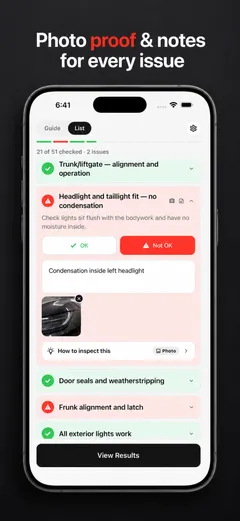
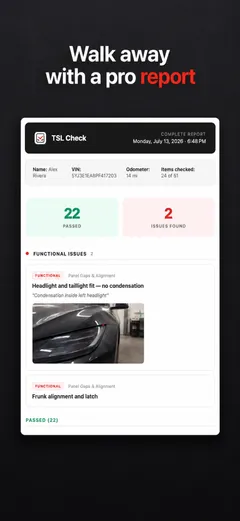
Whatever you find at delivery, ask the advisor to record it before you sign, and keep a copy.
Frequently asked questions
Which photos does Tesla ask for in a trade-in?
Tesla says it may ask for four clear daylight photos of the exterior (the entire driver side, the entire reverse side, the entire passenger side and the entire front), one photo of the interior, and clear photos of any damage. Tesla says photos may be requested in the Tesla app to receive a trade-in offer.
Can I take the trade-in photos in my garage?
No. Tesla's US support page says all photos must be taken outdoors in daylight and that photos taken inside a garage are not accepted.
Does the trade-in estimate include damage or modifications?
Not at first. Tesla says reported damage, mechanical issues and modifications are not accounted for in the estimate, but they are accounted for in the final offer after you place your order.
Is a Tesla trade-in offer negotiable?
Tesla says its offer is the best it can make within current market conditions, that trade-in offers are not negotiable and that it does not match competing offers. The final offer expires after 30 days or 1,000 miles, whichever comes first.
Can I trade in a car I still owe money on?
Yes, according to Tesla. It says you can trade in a vehicle you are still financing, and that it will calculate and compare the pay-off amount and any equity, positive or negative, that will be added to your Motor Vehicle Purchase Agreement.
What happens if I lost my title?
Tesla says trade-ins must be properly titled in the U.S. and that a physical title is typically required at delivery if you are not financing or leasing the car. If you cannot get a duplicate before delivery, Tesla says to contact your local Delivery team to ask whether you qualify for a title exception.